

How it works
With expression-based filtering rules, you can allow or deny any request that matches the criteria in the expression. Every rule takes the form of[allow | deny] if [expression is true].
Rules are evaluated in order they are listed:
- Rule expressions will resolve to a boolean that determines if the rule matches or not.
- The first rule that matches will determine if the request is allowed or denied.
- If no rules match, request is allowed by default.
Configuration
Managing of filtering rules is supported in both the Dashboard and via Management API. Inside the Dashboard, navigate to Security in the left-hand menu.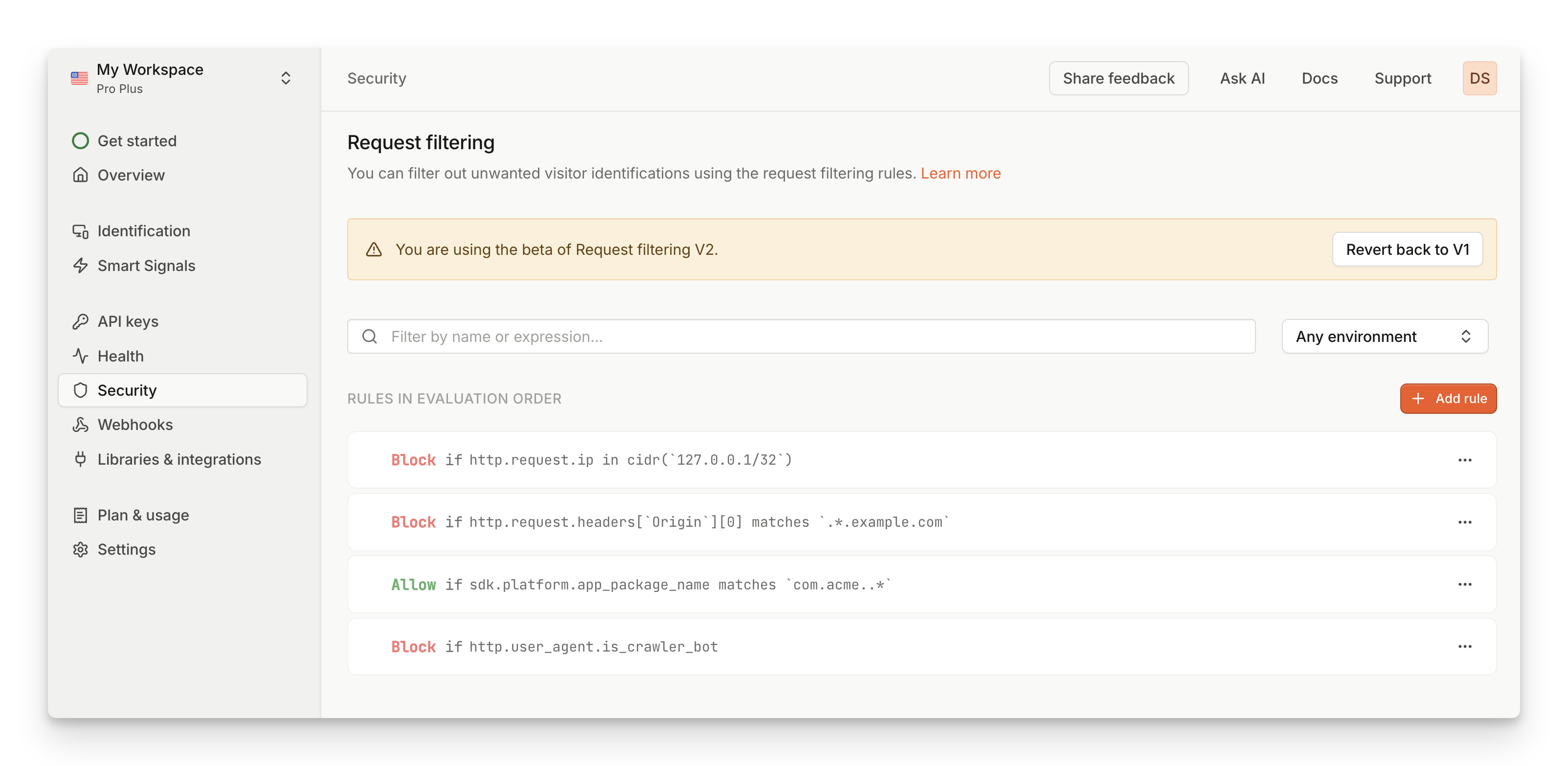
- Click on Add rule. New empty rule will be added at the bottom of the page.
- Select Allow or Deny if you want this rule to allow or deny the request
- Write your Rule expression. Check some examples or refer to full reference of expression language.
- Click on the Checkmark to save your rule. If the rule expression is not valid, you will see an error message.
- To reorder rules, drag & drop the rules in the list to your desired order.
Examples
Here are some examples of most common use cases which should cover all functionalities from the old version of request filtering rules. Check out Expression language reference for full list of available data points, operators and functions.Domain filtering
Domains are accessible in theOrigin request header.
- Allow requests from subdomain.example.com
[allow] http.request.headers['Origin'][0] == 'https://subdomain.example.com'
Network filtering
IP address is available inhttp.request.ip. It is a special type and needs to be compared to a valid CIDR notation.
- Allow requests from 123.0.0.1
[allow] http.request.ip in cidr('123.0.0.1/32')
- Deny requests from 123.0.0.1/16
[deny] http.request.ip in cidr('123.0.0.1/16')
Mobile app filtering
Bundle identifiers for mobile apps are available insdk.platform.app_package_name.
- Allow requests from com.acme.default
[allow] sdk.platform.app_package_name == 'com.acme.default'
Request header filtering
Request headers are available inhttp.request.headers and will contain any custom headers you’re sending.
- Allow requests from testing environments
[allow] http.request.headers['X-ENV'] == 'test'
- Deny requests referred from example.com
[deny] http.request.headers['Referer'] contains 'example.com'
Bots filtering
Requests identified as bots have boolean flags exposed inhttp.user_agent map.
- Allow requests from AI bots
[allow] http.user_agent.is_ai_bot
- Deny requests from crawler bots
[deny] http.user_agent.is_crawler_bot
Regular expressions
You can use regular expressions to search for string values that match a given pattern. When using regular expression, rule needs to usematches keyword, and the pattern string needs to be enclosed using backticks (`) instead of regular quotation marks.
- Deny requests from any subdomain on *.example.com
[deny] http.request.headers['Origin'][0] matches `^https://\S+\.example\.com$`
- Allow requests from all apps with root identifier com.acme.*
[deny] sdk.platform.app_package_name matches `^com\.acme\..*$`
Multiple conditions
With logical operators, you can chain multiple conditions into a single expression. Use the&& operator to indicate AND operator, and || operator to indicate OR operator.
- Deny requests from specific IP address on a specific domain
[deny] http.request.ip in cidr('123.0.0.1/32') && http.request.headers['Origin'][0] == 'https://example.com'
- Deny requests from either AI or crawler bots
[deny] http.user_agent.is_crawler_bot || http.user_agent.is_ai_bot
Limitations
The maximum number of request filtering rules on the web is defined by Account limits. If you need more request filtering rules, please reach out to our support team. In addition, there are additional limitations regarding specific rule expressions:- Max rule expression length: 1024 characters
- Max number of regular expression patterns allowed in a single expression: 10
Beta access
Request filtering V2 is currently in beta, which means that we are still refining the scope and functionalities. If you want access to the flexibility and control the new system offers with expression-based rules, you can contact support to enable you access to Request Filtering V2.Migration steps
- Once you have access, open the Dashboard and navigate to Security.
- Click on Try out V2. This will prompt you to confirm the migration process.
- Once migration is complete, all settings from V1 will be copied to V2.
- Enjoy the flexibility of new filtering rules!
- Click on Switch back to V1. This will prompt you to confirm rolling back to previous version.
- Your settings will be restored to the moment before you migrated to V2. This means any changes you made in V2 will be discarded.
- If you did revert back, please provide some feedback on how we can improve things.
Network request filtering