> ## Documentation Index
> Fetch the complete documentation index at: https://docs.fingerprint.com/llms.txt
> Use this file to discover all available pages before exploring further.
# Custom subdomain setup
Using a custom subdomain is required for correct identification while using Fingerprint.
## The benefits of using a custom subdomain
* Significant increase in accuracy in browsers with strict privacy features such as Safari or Firefox.
* Ad blockers can't block the JavaScript agent. Most ad blockers stop requests sent to an external URL, but allow requests sent to an internal URL like a subdomain.
* Cookies are recognized as "first-party." This means they can be saved in the visitor's browser and used to reliably identify visitors when third-party cookies are blocked completely (for example, Safari blocks all third-party cookies).
* Fingerprint becomes harder to detect. Requests made directly to the Fingerprint domain are easy to detect. Routing through a subdomain on your own domain makes Fingerprint harder for automated blockers and fraudsters to detect.
**Limitations of the subdomain integration**
Since Safari 16.4, cookie lifetime in Safari is reduced to 7 days when using the custom subdomain setup. To keep cookies lasting up to one year in Safari, use a cloud proxy integration such as the [Cloudflare proxy integration](/docs/v3/cloudflare-integration).
**A note on DNS setup**
This process requires adding DNS records to your domain, so make sure you have access to your DNS through your DNS provider. Here are guides for accessing DNS with some popular providers:
* [Cloudflare](https://developers.cloudflare.com/dns/manage-dns-records/how-to/create-dns-records/)
* [Route53](https://repost.aws/knowledge-center/route-53-create-alias-records)
* [GoDaddy](https://www.godaddy.com/help/add-a-cname-record-19236)
* [Netlify](https://docs.netlify.com/domains-https/custom-domains/configure-external-dns)
* [Dreamhost](https://help.dreamhost.com/hc/en-us/articles/360035516812-Adding-custom-DNS-records)
* [Bluehost](https://my.bluehost.com/hosting/help/resource/714)
## 1. Register your custom subdomain
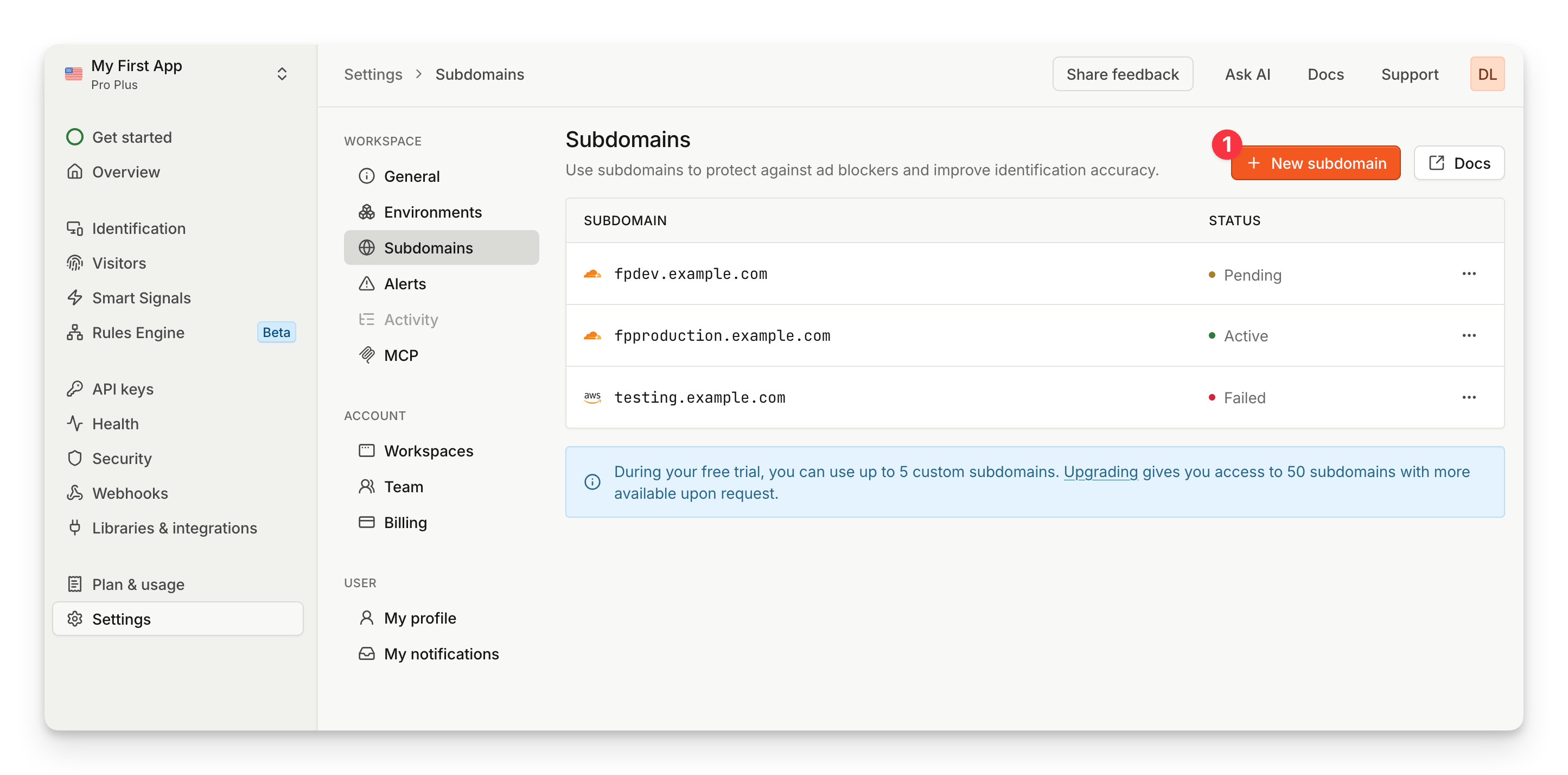
To use a custom subdomain, the connection between your site and Fingerprint must be secure, so Fingerprint registers every subdomain with an SSL certificate. Each workspace can have up to 50 unique subdomains. During your free trial, you can use up to 5. If you need more than 50, contact the [support team](https://fingerprint.com/support/).
To start, go to **Settings** > **[Subdomains](https://dashboard.fingerprint.com/subdomains)** and select **New subdomain**.
 Enter your domain, then select **Add domain**. Add each subdomain individually. After you add a subdomain, you can't edit it. You can view its DNS details at any time, but to change a subdomain, delete it and add it again.
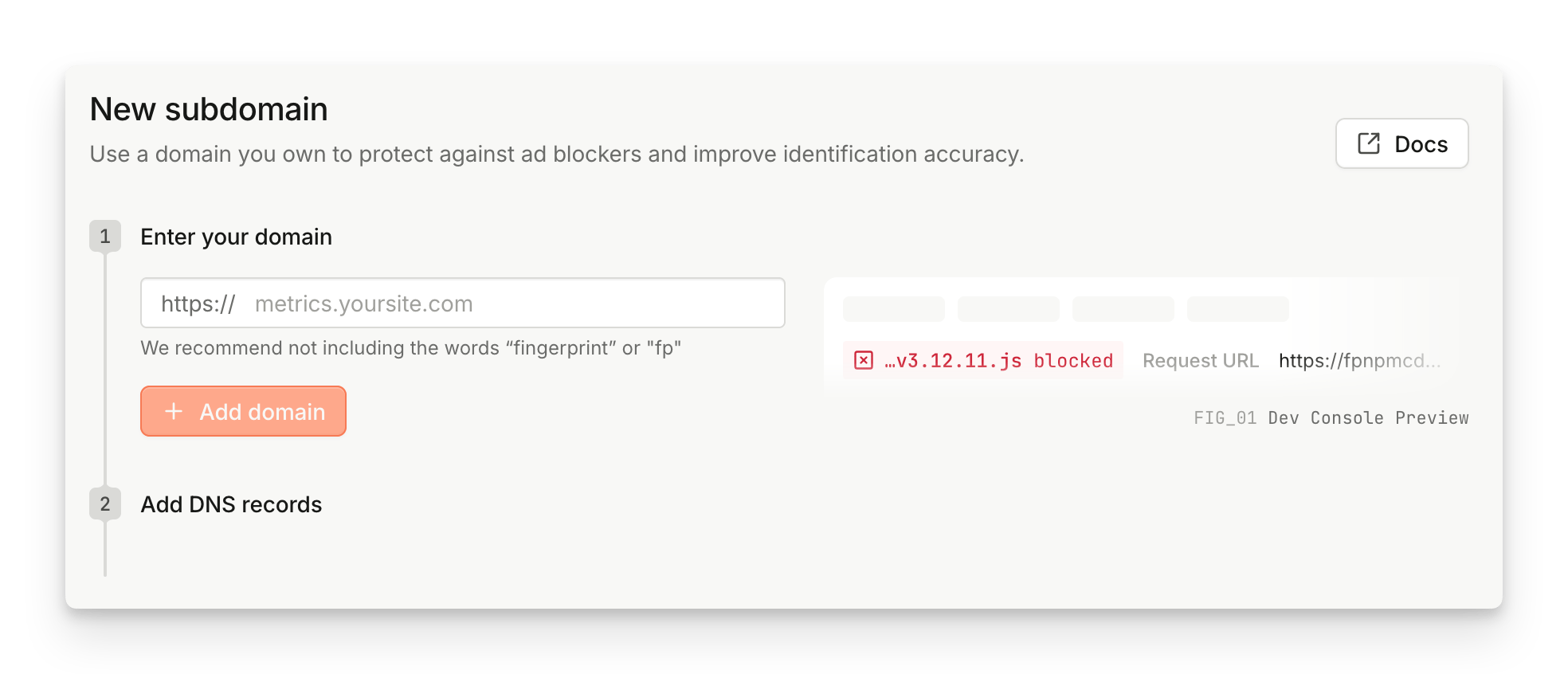 Follow these guidelines when choosing a subdomain:
* Use the subdomain only for sending requests to Fingerprint.
* Match the subdomain's primary domain to the request origin. For example, use `metrics.yourwebsite.com` when you run Fingerprint on `yourwebsite.com`.
* Avoid the words `fingerprint` and `fp` in the subdomain name. Names like `fingerprint.yourwebsite.com` or `fp.yourwebsite.com` are easier for ad blockers to detect and block. Use a neutral name like `metrics.yourwebsite.com` instead.
## 2. Add DNS records
After you add your domain, the dashboard shows every DNS record you need in one place:
* **One CNAME record** verifies that you own the domain.
* **Two A records** route identification traffic to Fingerprint.
To add every record at once, select **Copy all records** and paste them into your DNS provider. This uses the standard zone file format, which providers like Cloudflare and Route 53 accept for bulk import. You can also copy each record individually.
You can add the two A records right away. They start routing traffic once your certificate is issued.
Fingerprint also checks your domain for a conflicting CAA record. A CAA record controls which certificate authorities can issue certificates for your domain, and a conflicting one prevents Fingerprint's SSL provider (Cloudflare) from issuing yours. If Fingerprint finds a conflict, the dashboard shows an extra CAA record to add alongside the others, for example:
```
metrics.yourwebsite.com. CAA 0 issue "pki.goog"
```
After you add the records, Fingerprint checks for them automatically and updates the status on the Subdomains page. To run a check right away, click **Check DNS records**. Fingerprint also emails you once your certificate is issued.
DNS changes can take up to 24 hours to propagate. If Fingerprint doesn't detect your records yet, wait a while and click **Check DNS records** again. If your records aren't validated within 14 days, the subdomain becomes invalid and you'll need to start over.
### Subdomain statuses
Each subdomain shows one of these statuses:
* **Pending**: Fingerprint is validating your DNS records and issuing the SSL certificate. This can take up to 24 hours. To confirm a record was added correctly, run `dig HOST +short` in your terminal, using the host value of the record. If the record is set up correctly, its value is returned.
* **Active**: Your records are validated and the certificate is issued. Your subdomain is ready to use.
* **Failed**: The records were found, but the certificate can't be issued. This usually happens when a conflicting CAA record blocks Fingerprint's SSL provider (Cloudflare) from issuing certificates. Add the CAA record shown in the dashboard, wait for it to propagate, then delete the failed subdomain and add it again.
**Using Cloudflare as your DNS provider?**
1. Disable DNS proxying for all records associated with your subdomain.
2. Cloudflare sometimes adds CAA records that aren't visible in the DNS panel. To see them, run `dig caa yourwebsite.com`, replacing `yourwebsite.com` with your domain.
3. Cloudflare's [CNAME flattening](https://developers.cloudflare.com/dns/cname-flattening/) can prevent CNAME validation from working. Disable it if you have validation issues with Cloudflare DNS.
## 3. Configure the JavaScript agent
Once your subdomain is active, update the JavaScript agent configuration.
* Update the [`endpoint`](/reference/v3/js-agent-load-function#endpoint) property.
* Update the URL pattern used to download the agent ([`scriptUrlPattern`](/reference/v3/js-agent-load-function#scripturlpattern) for NPM packages or the `import` URL when using the CDN directly).
Use `defaultScriptUrlPattern` and `defaultEndpoint` as fallbacks. The JavaScript agent will continue working even if your custom subdomain becomes unavailable.
```ts CDN theme={"theme":"github-dark-dimmed"}
```
```javascript NPM theme={"theme":"github-dark-dimmed"}
import FingerprintJS from '@fingerprintjs/fingerprintjs-pro'
// Initialize the agent at application startup:
const fpPromise = FingerprintJS.load({
apiKey: 'PUBLIC_API_KEY',
scriptUrlPattern: [
// Leave the path as show here, only replace the domain
// All the parameters like are filled automatically by the package
// /reference/v3/js-agent-load-function#scripturlpattern
'https://metrics.yourwebsite.com/web/v//loader_v.js',
FingerprintJS.defaultScriptUrlPattern, // Use the default endpoint as fallback
],
endpoint: [
'https://metrics.yourwebsite.com',
FingerprintJS.defaultEndpoint, // The default endpoint as fallback
]
})
// When you need the visitor identifier:
fpPromise
.then(fp => fp.get())
.then(result => console.log(result.visitorId))
```
This snippet is also available in the dashboard on the subdomain setup page, prefilled with your custom subdomain.
**Notes:**
* The endpoint subdomain should match the domain of your website.
* If you use a [Content Security Policy](https://developer.mozilla.org/en-US/docs/Web/HTTP/CSP) on your website, add the custom subdomain to the `connect-src` directive of your policy. See [the CSP guide](/docs/v3/js-agent-csp) for more details.
* If you issued a wildcard SSL certificate, the URL shows an asterisk, for example `*.yourwebsite.com`. Replace the asterisk with the subdomain you plan to use, for example `metrics.yourwebsite.com`.
## Frequently asked questions
### I completed the setup. How can I add more subdomains?
To add more subdomains, add them individually at any time:
1. Go to **Settings** > **[Subdomains](https://dashboard.fingerprint.com/subdomains)** and select **New subdomain**.
2. Repeat the [setup steps](/docs/v3/custom-subdomain-setup#1-register-your-custom-subdomain) for each new subdomain.
Each workspace can have up to 50 unique subdomains. During your free trial, you can use up to 5. If you need to manage more subdomains easily, check out the [Cloudflare proxy integration](/docs/v3/cloudflare-integration). To request additional subdomains, contact the [support team](https://fingerprint.com/support/).
Follow these guidelines when choosing a subdomain:
* Use the subdomain only for sending requests to Fingerprint.
* Match the subdomain's primary domain to the request origin. For example, use `metrics.yourwebsite.com` when you run Fingerprint on `yourwebsite.com`.
* Avoid the words `fingerprint` and `fp` in the subdomain name. Names like `fingerprint.yourwebsite.com` or `fp.yourwebsite.com` are easier for ad blockers to detect and block. Use a neutral name like `metrics.yourwebsite.com` instead.
## 2. Add DNS records
After you add your domain, the dashboard shows every DNS record you need in one place:
* **One CNAME record** verifies that you own the domain.
* **Two A records** route identification traffic to Fingerprint.
To add every record at once, select **Copy all records** and paste them into your DNS provider. This uses the standard zone file format, which providers like Cloudflare and Route 53 accept for bulk import. You can also copy each record individually.
You can add the two A records right away. They start routing traffic once your certificate is issued.
Fingerprint also checks your domain for a conflicting CAA record. A CAA record controls which certificate authorities can issue certificates for your domain, and a conflicting one prevents Fingerprint's SSL provider (Cloudflare) from issuing yours. If Fingerprint finds a conflict, the dashboard shows an extra CAA record to add alongside the others, for example:
```
metrics.yourwebsite.com. CAA 0 issue "pki.goog"
```
After you add the records, Fingerprint checks for them automatically and updates the status on the Subdomains page. To run a check right away, click **Check DNS records**. Fingerprint also emails you once your certificate is issued.
DNS changes can take up to 24 hours to propagate. If Fingerprint doesn't detect your records yet, wait a while and click **Check DNS records** again. If your records aren't validated within 14 days, the subdomain becomes invalid and you'll need to start over.
### Subdomain statuses
Each subdomain shows one of these statuses:
* **Pending**: Fingerprint is validating your DNS records and issuing the SSL certificate. This can take up to 24 hours. To confirm a record was added correctly, run `dig HOST +short` in your terminal, using the host value of the record. If the record is set up correctly, its value is returned.
* **Active**: Your records are validated and the certificate is issued. Your subdomain is ready to use.
* **Failed**: The records were found, but the certificate can't be issued. This usually happens when a conflicting CAA record blocks Fingerprint's SSL provider (Cloudflare) from issuing certificates. Add the CAA record shown in the dashboard, wait for it to propagate, then delete the failed subdomain and add it again.
**Using Cloudflare as your DNS provider?**
1. Disable DNS proxying for all records associated with your subdomain.
2. Cloudflare sometimes adds CAA records that aren't visible in the DNS panel. To see them, run `dig caa yourwebsite.com`, replacing `yourwebsite.com` with your domain.
3. Cloudflare's [CNAME flattening](https://developers.cloudflare.com/dns/cname-flattening/) can prevent CNAME validation from working. Disable it if you have validation issues with Cloudflare DNS.
## 3. Configure the JavaScript agent
Once your subdomain is active, update the JavaScript agent configuration.
* Update the [`endpoint`](/reference/v3/js-agent-load-function#endpoint) property.
* Update the URL pattern used to download the agent ([`scriptUrlPattern`](/reference/v3/js-agent-load-function#scripturlpattern) for NPM packages or the `import` URL when using the CDN directly).
Use `defaultScriptUrlPattern` and `defaultEndpoint` as fallbacks. The JavaScript agent will continue working even if your custom subdomain becomes unavailable.
```ts CDN theme={"theme":"github-dark-dimmed"}
```
```javascript NPM theme={"theme":"github-dark-dimmed"}
import FingerprintJS from '@fingerprintjs/fingerprintjs-pro'
// Initialize the agent at application startup:
const fpPromise = FingerprintJS.load({
apiKey: 'PUBLIC_API_KEY',
scriptUrlPattern: [
// Leave the path as show here, only replace the domain
// All the parameters like are filled automatically by the package
// /reference/v3/js-agent-load-function#scripturlpattern
'https://metrics.yourwebsite.com/web/v//loader_v.js',
FingerprintJS.defaultScriptUrlPattern, // Use the default endpoint as fallback
],
endpoint: [
'https://metrics.yourwebsite.com',
FingerprintJS.defaultEndpoint, // The default endpoint as fallback
]
})
// When you need the visitor identifier:
fpPromise
.then(fp => fp.get())
.then(result => console.log(result.visitorId))
```
This snippet is also available in the dashboard on the subdomain setup page, prefilled with your custom subdomain.
**Notes:**
* The endpoint subdomain should match the domain of your website.
* If you use a [Content Security Policy](https://developer.mozilla.org/en-US/docs/Web/HTTP/CSP) on your website, add the custom subdomain to the `connect-src` directive of your policy. See [the CSP guide](/docs/v3/js-agent-csp) for more details.
* If you issued a wildcard SSL certificate, the URL shows an asterisk, for example `*.yourwebsite.com`. Replace the asterisk with the subdomain you plan to use, for example `metrics.yourwebsite.com`.
## Frequently asked questions
### I completed the setup. How can I add more subdomains?
To add more subdomains, add them individually at any time:
1. Go to **Settings** > **[Subdomains](https://dashboard.fingerprint.com/subdomains)** and select **New subdomain**.
2. Repeat the [setup steps](/docs/v3/custom-subdomain-setup#1-register-your-custom-subdomain) for each new subdomain.
Each workspace can have up to 50 unique subdomains. During your free trial, you can use up to 5. If you need to manage more subdomains easily, check out the [Cloudflare proxy integration](/docs/v3/cloudflare-integration). To request additional subdomains, contact the [support team](https://fingerprint.com/support/).