> ## Documentation Index
> Fetch the complete documentation index at: https://docs.fingerprint.com/llms.txt
> Use this file to discover all available pages before exploring further.
# Sealed Client Results
> Receive an encrypted payload in the JavaScript agent with all information available in the /v4/events endpoint, meant to be decrypted and used on your backend.
**Availability**
* JavaScript agent version [**4.0.0**+](/docs/changelog-javascript-agent#v4-0-0)
## How Sealed Client Results work
Sealed Client Results is an alternative delivery mechanism for information normally available only through our [Server API](/reference/server-api-get-event). Usually, you would need to call the Server API on your backend to:
* Validate the authenticity of the visitor ID and other information sent from the client.
* Get the full identification event, including [Smart Signals](/docs/smart-signals-reference).
With Sealed Results, the client agent response payload contains the same JSON structure that is available through the [`/v4/events` Server API](/reference/server-api-get-event) endpoint. This has two main advantages:
* Reduced end-to-end latency — unsealing the result happens on your server, no need to call the Server API.
* Increased secrecy — the payload is fully encrypted with a symmetric key, making it impossible for a malicious actor to read or modify the results on the client, similar to [Zero Trust Mode](/docs/zero-trust-mode).
Sealed results make it faster, safer, and more straightforward to integrate Fingerprint Identification results into your application.
## Data flow
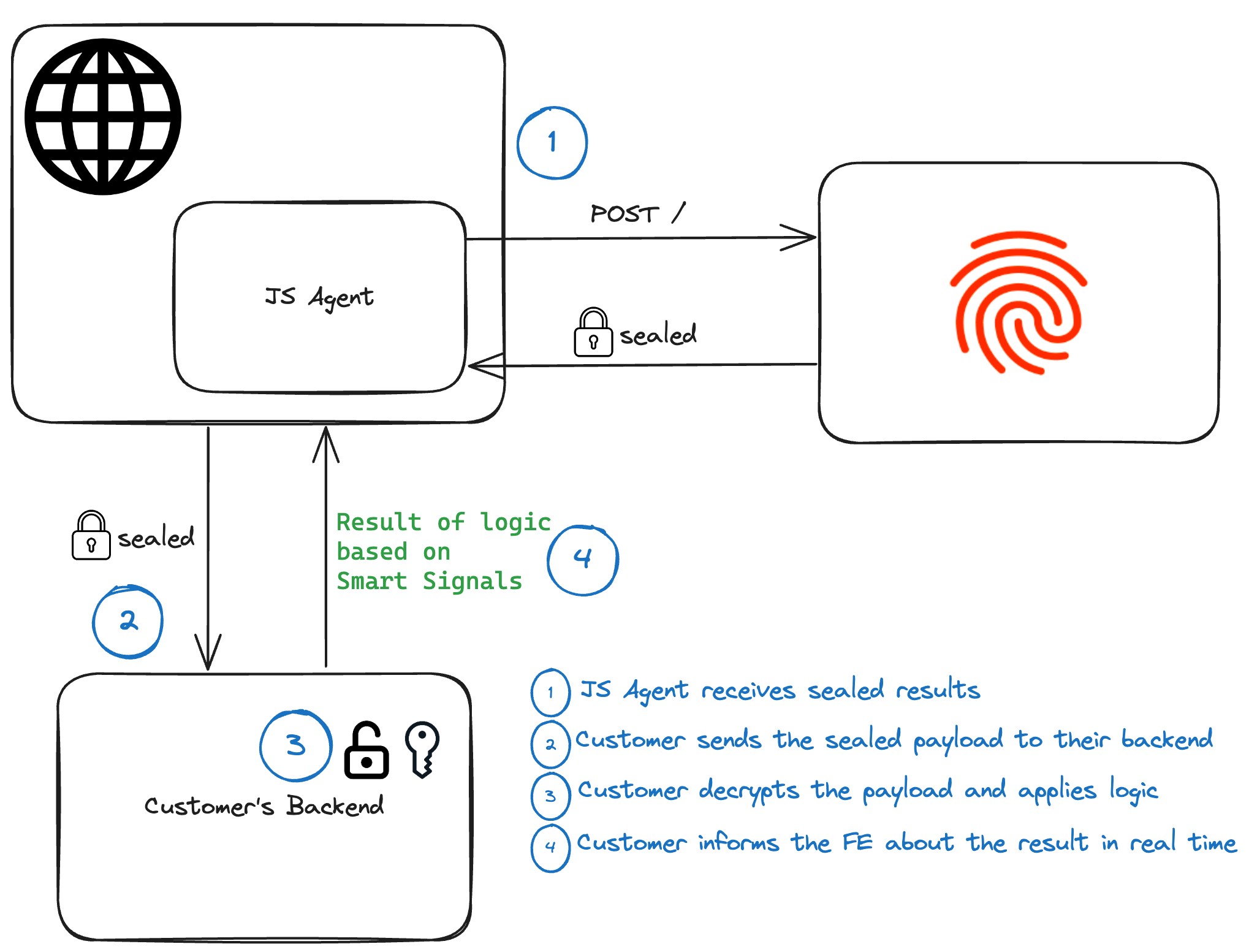 ## Configuring Sealed Client Results
If you want to use Sealed Client Results, complete the following steps (the order is important):
1. Find an **Encryption key** for your environment in the Dashboard.
2. Set up your backend to accept Sealed Results and decrypt them with that key.
3. Prepare your frontend to start sending the encrypted payload to the backend.
4. Activate the **Encryption key** in the Dashboard to start receiving Sealed Client Results in the JavaScript agent response.
### Step 1: Find an encryption key in the Dashboard
Navigate to **Dashboard** > **[API Keys](https://dashboard.fingerprint.com/api-keys)** > **Sealed Client Results**.
## Configuring Sealed Client Results
If you want to use Sealed Client Results, complete the following steps (the order is important):
1. Find an **Encryption key** for your environment in the Dashboard.
2. Set up your backend to accept Sealed Results and decrypt them with that key.
3. Prepare your frontend to start sending the encrypted payload to the backend.
4. Activate the **Encryption key** in the Dashboard to start receiving Sealed Client Results in the JavaScript agent response.
### Step 1: Find an encryption key in the Dashboard
Navigate to **Dashboard** > **[API Keys](https://dashboard.fingerprint.com/api-keys)** > **Sealed Client Results**.
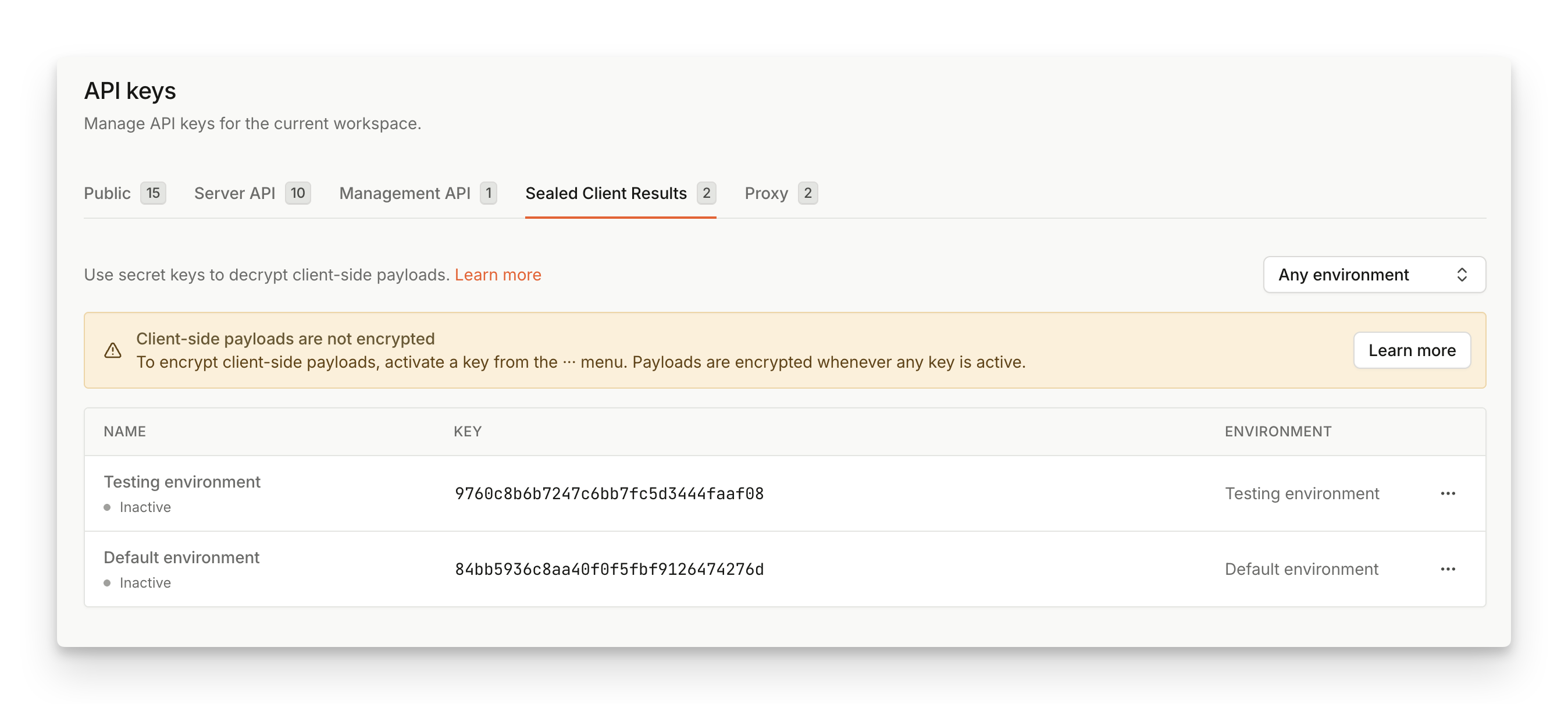 You will see a list of **inactive encryption keys**, with each environment having a single key associated with it.
Copy the **Encryption key** in its **base64** representation to use on your backend.
The **Encryption key** should remain `Inactive` for now.
### Step 2: Decrypt and validate the `sealed_result` payload on your backend
Once the payload arrives at your backend, it needs to be **decrypted using the Encryption key found in the previous step**.
In JavaScript agent v4, `sealed_result` is returned as `BinaryOutput`, not as a string. Before sending it to your server, serialize it with one of the `BinaryOutput` methods:
* `base64()`
* `byteArray()`
* `blob()`
* `toString()`
* `toJSON()`
The examples below use `base64()`. The base64 payload has a format covered in [Appendix: Payload format](#appendix-payload-format).
The easiest way to decrypt the sealed result is to use one of our [Server SDKs](/reference/server-sdks).
```javascript Node SDK theme={"theme":"github-dark-dimmed"}
// Requires Node SDK v7.0 or higher
const { unsealEventsResponse, DecryptionAlgorithm } = require('@fingerprint/node-sdk');
async function main() {
const sealedDataBase64 = process.env.BASE64_SEALED_RESULT;
const decryptionKey = process.env.BASE64_KEY;
if (!sealedDataBase64 || !decryptionKey) {
console.error('Please set BASE64_KEY and BASE64_SEALED_RESULT environment variables');
process.exit(1);
}
try {
const unsealedData = await unsealEventsResponse(Buffer.from(sealedDataBase64, 'base64'), [
{
key: Buffer.from(decryptionKey, 'base64'),
algorithm: DecryptionAlgorithm.Aes256Gcm,
},
]);
console.log(JSON.stringify(unsealedData, null, 2));
} catch (e) {
console.error(e);
process.exit(1);
}
}
main();
```
```php PHP SDK theme={"theme":"github-dark-dimmed"}
getMessage()));
exit(1);
}
```
```go Go SDK theme={"theme":"github-dark-dimmed"}
package main
import (
"encoding/base64"
"fmt"
"os"
// Requires Go SDK v8 or higher
"github.com/fingerprintjs/go-sdk/v8"
)
// Utility function to decode base64 string
func base64Decode(input string) []byte {
output, err := base64.StdEncoding.DecodeString(input)
if err != nil {
panic(err)
}
return output
}
func main() {
// Sealed result from the frontend.
sealedResultBytes := base64Decode(os.Getenv("BASE64_SEALED_RESULT"))
// Base64 encoded key generated in the dashboard.
key := base64Decode(os.Getenv("BASE64_KEY"))
keys := []fingerprint.DecryptionKey{
// You can provide more than one key to support key rotation. The SDK will try to decrypt the result with each key.
{
Key: key,
Algorithm: fingerprint.AlgorithmAES256GCM,
},
}
unsealedResponse, err := fingerprint.UnsealEventsResponse(sealedResultBytes, keys)
if err != nil {
panic(err)
}
// Do something with unsealed response, e.g: send it back to the frontend.
fmt.Println(unsealedResponse)
}
```
```java Java SDK theme={"theme":"github-dark-dimmed"}
// Requires Java SDK v8.0.0 or higher
package com.fingerprint.example;
import com.fingerprint.v4.Sealed;
import com.fingerprint.v4.model.Event;
import java.util.Base64;
public class SealedResults {
public static void main(String... args) throws Exception {
// Sealed result from the frontend.
String SEALED_RESULT_BASE64 = System.getenv("BASE64_SEALED_RESULT");
// Base64 encoded key generated in the dashboard.
String SEALED_KEY = System.getenv("BASE64_KEY");
final Event event = Sealed.unsealEventResponse(
Base64.getDecoder().decode(SEALED_RESULT_BASE64),
// You can provide more than one key to support key rotation. The SDK will try to decrypt the result with each key.
new Sealed.DecryptionKey[]{
new Sealed.DecryptionKey(
Base64.getDecoder().decode(SEALED_KEY),
Sealed.DecryptionAlgorithm.AES_256_GCM
)
}
);
System.out.println(event);
}
}
```
```csharp C# .NET SDK theme={"theme":"github-dark-dimmed"}
// Requires .NET SDK v8.0.0 or higher
using System.Text.Json;
using Fingerprint.ServerSdk;
var sealedResultBase64 = Environment.GetEnvironmentVariable("BASE64_SEALED_RESULT")!;
var sealedKey = Environment.GetEnvironmentVariable("BASE64_KEY")!;
var eventResponse = Sealed.UnsealEventResponse(Convert.FromBase64String(sealedResultBase64), new[]
{
new Sealed.DecryptionKey(Convert.FromBase64String(sealedKey), Sealed.DecryptionAlgorithm.Aes256Gcm)
});
Console.WriteLine(JsonSerializer.Serialize(eventResponse));
```
```python Python SDK theme={"theme":"github-dark-dimmed"}
# Requires Python SDK v9.0 or higher
import base64
import os
from dotenv import load_dotenv
from fingerprint_server_sdk import unseal_event_response, DecryptionKey, DecryptionAlgorithm
load_dotenv()
sealed_result_bytes = base64.b64decode(os.environ["BASE64_SEALED_RESULT"])
key = base64.b64decode(os.environ["BASE64_KEY"])
try:
event_response = unseal_event_response(sealed_result_bytes, [DecryptionKey(key, DecryptionAlgorithm['Aes256Gcm'])])
print("\n\n\nEvent response: \n", event_response)
except Exception as e:
print("Exception when calling unseal_event_response: %s\n" % e)
exit(1)
print("Unseal successful!")
exit(0)
```
If you prefer to write the decryption code yourself, see the [Appendix](#appendix-payload-format) at the end of this page for some examples. The SDKs are open-source so you can also refer to their source code on GitHub.
**Never decrypt the payload in the browser**
The decryption is designed to work on the **backend only**. If you try to decrypt the payload on the client, it means that anyone can see the shared key. That opens the possibility to read and alter the payload, exposing sensitive information and introducing new attack vectors.
### Step 3: Send `sealed_result` to your backend
Adjust your client code to serialize and send the `sealed_result` received from the Fingerprint JavaScript agent to the server endpoint you prepared in the previous step:
```javascript Client Code theme={"theme":"github-dark-dimmed"}
import * as Fingerprint from '@fingerprint/agent'
const fp = Fingerprint.start({
apiKey: "PUBLIC_API_KEY"
});
fp.get()
.then(fingerprint => {
if (!fingerprint.sealed_result) {
throw new Error("Sealed Client Results are not available for this response")
}
const sealed_result_base64 = fingerprint.sealed_result.base64()
fetch("https://your-backend.com/sealed", {
method: "POST",
headers: { "Content-Type": "application/json" },
body: JSON.stringify({
event_id: fingerprint.event_id,
sealed_result_base64,
})
})
.then(response => console.log("Finished with status: ", response.status))
})
.catch(err => console.error("Failed to complete Sealed Client Results flow with error: ", err));
```
```json Response theme={"theme":"github-dark-dimmed"}
{
"event_id": "1748472295686.1yRrKC",
"sealed_result_base64": ""
}
```
**Server API Fallback**
You may also consider sending the `event_id` that is returned in the regular JavaScript agent response to support the fallback to [Server API](/reference/server-api) request if something goes wrong and `sealed_result` is not available.
### Step 4: Activate the encryption key in the Dashboard
Once the backend is set up to accept and decrypt incoming traffic, and the frontend contains code to send the `sealed_result` to the backend, you can activate your **Encryption key**.
1. Navigate to **Dashboard** > **[API Keys](https://dashboard.fingerprint.com/api-keys)** > **Sealed Client Results**.
2. Find the key you want to activate, click `...` and select **Activate**.
3. Once active, all events from the associated environment will be sealed using the encryption key.
You will see a list of **inactive encryption keys**, with each environment having a single key associated with it.
Copy the **Encryption key** in its **base64** representation to use on your backend.
The **Encryption key** should remain `Inactive` for now.
### Step 2: Decrypt and validate the `sealed_result` payload on your backend
Once the payload arrives at your backend, it needs to be **decrypted using the Encryption key found in the previous step**.
In JavaScript agent v4, `sealed_result` is returned as `BinaryOutput`, not as a string. Before sending it to your server, serialize it with one of the `BinaryOutput` methods:
* `base64()`
* `byteArray()`
* `blob()`
* `toString()`
* `toJSON()`
The examples below use `base64()`. The base64 payload has a format covered in [Appendix: Payload format](#appendix-payload-format).
The easiest way to decrypt the sealed result is to use one of our [Server SDKs](/reference/server-sdks).
```javascript Node SDK theme={"theme":"github-dark-dimmed"}
// Requires Node SDK v7.0 or higher
const { unsealEventsResponse, DecryptionAlgorithm } = require('@fingerprint/node-sdk');
async function main() {
const sealedDataBase64 = process.env.BASE64_SEALED_RESULT;
const decryptionKey = process.env.BASE64_KEY;
if (!sealedDataBase64 || !decryptionKey) {
console.error('Please set BASE64_KEY and BASE64_SEALED_RESULT environment variables');
process.exit(1);
}
try {
const unsealedData = await unsealEventsResponse(Buffer.from(sealedDataBase64, 'base64'), [
{
key: Buffer.from(decryptionKey, 'base64'),
algorithm: DecryptionAlgorithm.Aes256Gcm,
},
]);
console.log(JSON.stringify(unsealedData, null, 2));
} catch (e) {
console.error(e);
process.exit(1);
}
}
main();
```
```php PHP SDK theme={"theme":"github-dark-dimmed"}
getMessage()));
exit(1);
}
```
```go Go SDK theme={"theme":"github-dark-dimmed"}
package main
import (
"encoding/base64"
"fmt"
"os"
// Requires Go SDK v8 or higher
"github.com/fingerprintjs/go-sdk/v8"
)
// Utility function to decode base64 string
func base64Decode(input string) []byte {
output, err := base64.StdEncoding.DecodeString(input)
if err != nil {
panic(err)
}
return output
}
func main() {
// Sealed result from the frontend.
sealedResultBytes := base64Decode(os.Getenv("BASE64_SEALED_RESULT"))
// Base64 encoded key generated in the dashboard.
key := base64Decode(os.Getenv("BASE64_KEY"))
keys := []fingerprint.DecryptionKey{
// You can provide more than one key to support key rotation. The SDK will try to decrypt the result with each key.
{
Key: key,
Algorithm: fingerprint.AlgorithmAES256GCM,
},
}
unsealedResponse, err := fingerprint.UnsealEventsResponse(sealedResultBytes, keys)
if err != nil {
panic(err)
}
// Do something with unsealed response, e.g: send it back to the frontend.
fmt.Println(unsealedResponse)
}
```
```java Java SDK theme={"theme":"github-dark-dimmed"}
// Requires Java SDK v8.0.0 or higher
package com.fingerprint.example;
import com.fingerprint.v4.Sealed;
import com.fingerprint.v4.model.Event;
import java.util.Base64;
public class SealedResults {
public static void main(String... args) throws Exception {
// Sealed result from the frontend.
String SEALED_RESULT_BASE64 = System.getenv("BASE64_SEALED_RESULT");
// Base64 encoded key generated in the dashboard.
String SEALED_KEY = System.getenv("BASE64_KEY");
final Event event = Sealed.unsealEventResponse(
Base64.getDecoder().decode(SEALED_RESULT_BASE64),
// You can provide more than one key to support key rotation. The SDK will try to decrypt the result with each key.
new Sealed.DecryptionKey[]{
new Sealed.DecryptionKey(
Base64.getDecoder().decode(SEALED_KEY),
Sealed.DecryptionAlgorithm.AES_256_GCM
)
}
);
System.out.println(event);
}
}
```
```csharp C# .NET SDK theme={"theme":"github-dark-dimmed"}
// Requires .NET SDK v8.0.0 or higher
using System.Text.Json;
using Fingerprint.ServerSdk;
var sealedResultBase64 = Environment.GetEnvironmentVariable("BASE64_SEALED_RESULT")!;
var sealedKey = Environment.GetEnvironmentVariable("BASE64_KEY")!;
var eventResponse = Sealed.UnsealEventResponse(Convert.FromBase64String(sealedResultBase64), new[]
{
new Sealed.DecryptionKey(Convert.FromBase64String(sealedKey), Sealed.DecryptionAlgorithm.Aes256Gcm)
});
Console.WriteLine(JsonSerializer.Serialize(eventResponse));
```
```python Python SDK theme={"theme":"github-dark-dimmed"}
# Requires Python SDK v9.0 or higher
import base64
import os
from dotenv import load_dotenv
from fingerprint_server_sdk import unseal_event_response, DecryptionKey, DecryptionAlgorithm
load_dotenv()
sealed_result_bytes = base64.b64decode(os.environ["BASE64_SEALED_RESULT"])
key = base64.b64decode(os.environ["BASE64_KEY"])
try:
event_response = unseal_event_response(sealed_result_bytes, [DecryptionKey(key, DecryptionAlgorithm['Aes256Gcm'])])
print("\n\n\nEvent response: \n", event_response)
except Exception as e:
print("Exception when calling unseal_event_response: %s\n" % e)
exit(1)
print("Unseal successful!")
exit(0)
```
If you prefer to write the decryption code yourself, see the [Appendix](#appendix-payload-format) at the end of this page for some examples. The SDKs are open-source so you can also refer to their source code on GitHub.
**Never decrypt the payload in the browser**
The decryption is designed to work on the **backend only**. If you try to decrypt the payload on the client, it means that anyone can see the shared key. That opens the possibility to read and alter the payload, exposing sensitive information and introducing new attack vectors.
### Step 3: Send `sealed_result` to your backend
Adjust your client code to serialize and send the `sealed_result` received from the Fingerprint JavaScript agent to the server endpoint you prepared in the previous step:
```javascript Client Code theme={"theme":"github-dark-dimmed"}
import * as Fingerprint from '@fingerprint/agent'
const fp = Fingerprint.start({
apiKey: "PUBLIC_API_KEY"
});
fp.get()
.then(fingerprint => {
if (!fingerprint.sealed_result) {
throw new Error("Sealed Client Results are not available for this response")
}
const sealed_result_base64 = fingerprint.sealed_result.base64()
fetch("https://your-backend.com/sealed", {
method: "POST",
headers: { "Content-Type": "application/json" },
body: JSON.stringify({
event_id: fingerprint.event_id,
sealed_result_base64,
})
})
.then(response => console.log("Finished with status: ", response.status))
})
.catch(err => console.error("Failed to complete Sealed Client Results flow with error: ", err));
```
```json Response theme={"theme":"github-dark-dimmed"}
{
"event_id": "1748472295686.1yRrKC",
"sealed_result_base64": ""
}
```
**Server API Fallback**
You may also consider sending the `event_id` that is returned in the regular JavaScript agent response to support the fallback to [Server API](/reference/server-api) request if something goes wrong and `sealed_result` is not available.
### Step 4: Activate the encryption key in the Dashboard
Once the backend is set up to accept and decrypt incoming traffic, and the frontend contains code to send the `sealed_result` to the backend, you can activate your **Encryption key**.
1. Navigate to **Dashboard** > **[API Keys](https://dashboard.fingerprint.com/api-keys)** > **Sealed Client Results**.
2. Find the key you want to activate, click `...` and select **Activate**.
3. Once active, all events from the associated environment will be sealed using the encryption key.
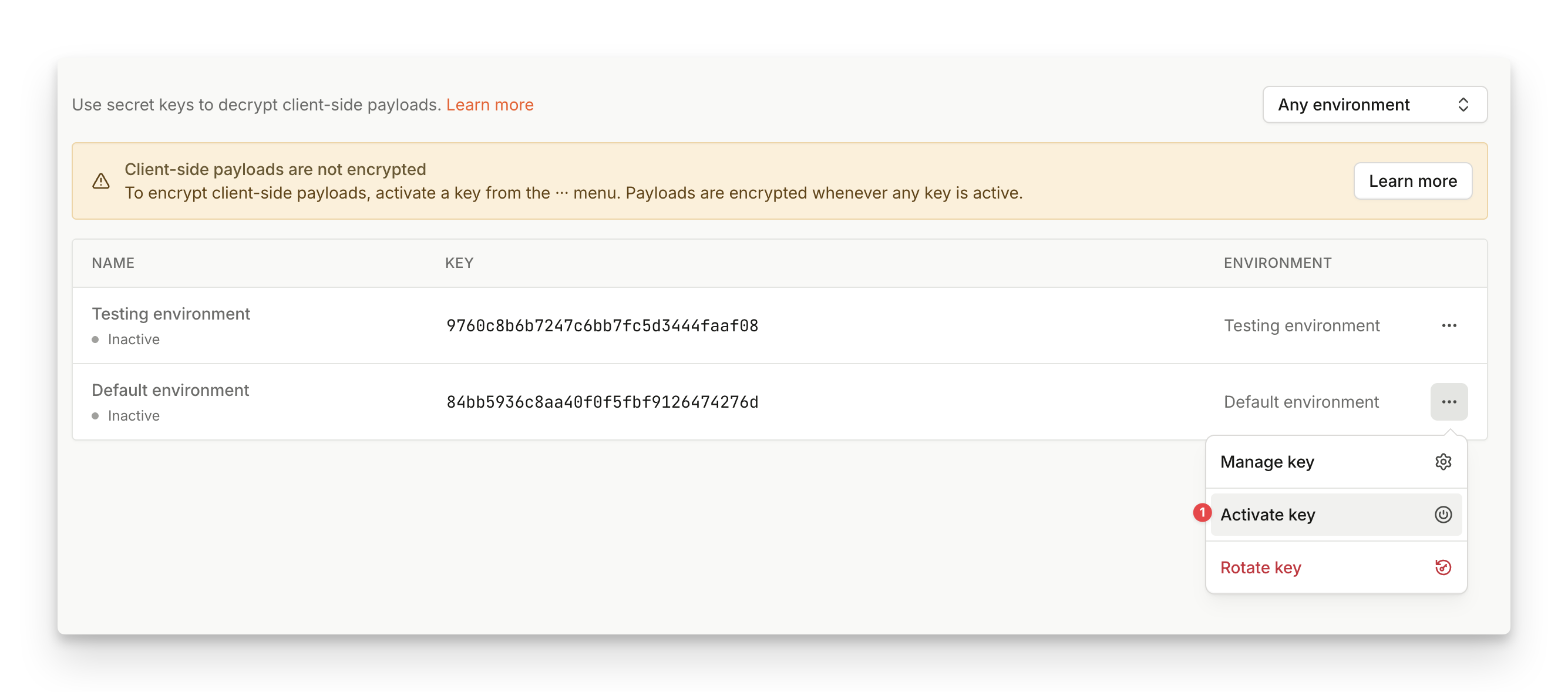 That completes the setup and the `sealed_result` payload should start flowing from your client to your backend. Note that the key propagation could take a few minutes to finish so don't worry if you don't see the `sealed_result` payload immediately after the key got activated.
When a key is activated, the JavaScript agent removes everything except `event_id` and
`sealed_result` from the payload. Make sure that there is nothing left on the client that depends
on the original (unencrypted) payload **before activating** the first key.
## Sealed Client Results with multiple environments
Sealed results are scoped to a specific **environment**. When creating an environment, an **inactive encryption key** will be automatically generated.
By activating encryption keys, you are selecting on which environment you want payload to be encrypted. If you're utilizing multiple environments, this means you can partially select for which environment you want to turn on Sealed Client Results.
Payloads will only be encrypted on environments with an active encryption key. On other environments, payload will remain unchanged.
This is beneficial if you would like to incrementally integrate Sealed Client Results into your multi-environment setup, or if you'd like to test Sealed Client Results on a smaller chunk of traffic before rolling it out everywhere.
## Key Rotation
We recommend creating a regular process for key rotation to prevent potential misuse. The generated keys don't expire but it is advised to rotate the key every 3 months, or before reaching a total of 4 billion requests, or if the key might have leaked (whatever comes first).
In all cases, follow these steps:
1. Navigate to **Dashboard** > **[API Keys](https://dashboard.fingerprint.com/api-keys)** > **Sealed Client Results**.
2. Find the key you want to rotate, click `...` and select **Rotate**.
3. In the dialog, you will find the **new key** that will replace the existing key after the rotation. Save the value of the next key and you can safely close the dialog.
4. **Update the backend** to try unsealing with both the old (original) and the new key.
5. Once your backend is ready to work with the new key, return to the dashboard and re-open the rotation dialog from step 2.
6. Click on **Rotate**. The old key is deactivated as there cannot be more than one key active at a time.
7. Wait a few moments until your backend starts receiving results sealed with the new key exclusively. Optionally, you can then completely remove the old key from the backend logic.
That completes the setup and the `sealed_result` payload should start flowing from your client to your backend. Note that the key propagation could take a few minutes to finish so don't worry if you don't see the `sealed_result` payload immediately after the key got activated.
When a key is activated, the JavaScript agent removes everything except `event_id` and
`sealed_result` from the payload. Make sure that there is nothing left on the client that depends
on the original (unencrypted) payload **before activating** the first key.
## Sealed Client Results with multiple environments
Sealed results are scoped to a specific **environment**. When creating an environment, an **inactive encryption key** will be automatically generated.
By activating encryption keys, you are selecting on which environment you want payload to be encrypted. If you're utilizing multiple environments, this means you can partially select for which environment you want to turn on Sealed Client Results.
Payloads will only be encrypted on environments with an active encryption key. On other environments, payload will remain unchanged.
This is beneficial if you would like to incrementally integrate Sealed Client Results into your multi-environment setup, or if you'd like to test Sealed Client Results on a smaller chunk of traffic before rolling it out everywhere.
## Key Rotation
We recommend creating a regular process for key rotation to prevent potential misuse. The generated keys don't expire but it is advised to rotate the key every 3 months, or before reaching a total of 4 billion requests, or if the key might have leaked (whatever comes first).
In all cases, follow these steps:
1. Navigate to **Dashboard** > **[API Keys](https://dashboard.fingerprint.com/api-keys)** > **Sealed Client Results**.
2. Find the key you want to rotate, click `...` and select **Rotate**.
3. In the dialog, you will find the **new key** that will replace the existing key after the rotation. Save the value of the next key and you can safely close the dialog.
4. **Update the backend** to try unsealing with both the old (original) and the new key.
5. Once your backend is ready to work with the new key, return to the dashboard and re-open the rotation dialog from step 2.
6. Click on **Rotate**. The old key is deactivated as there cannot be more than one key active at a time.
7. Wait a few moments until your backend starts receiving results sealed with the new key exclusively. Optionally, you can then completely remove the old key from the backend logic.
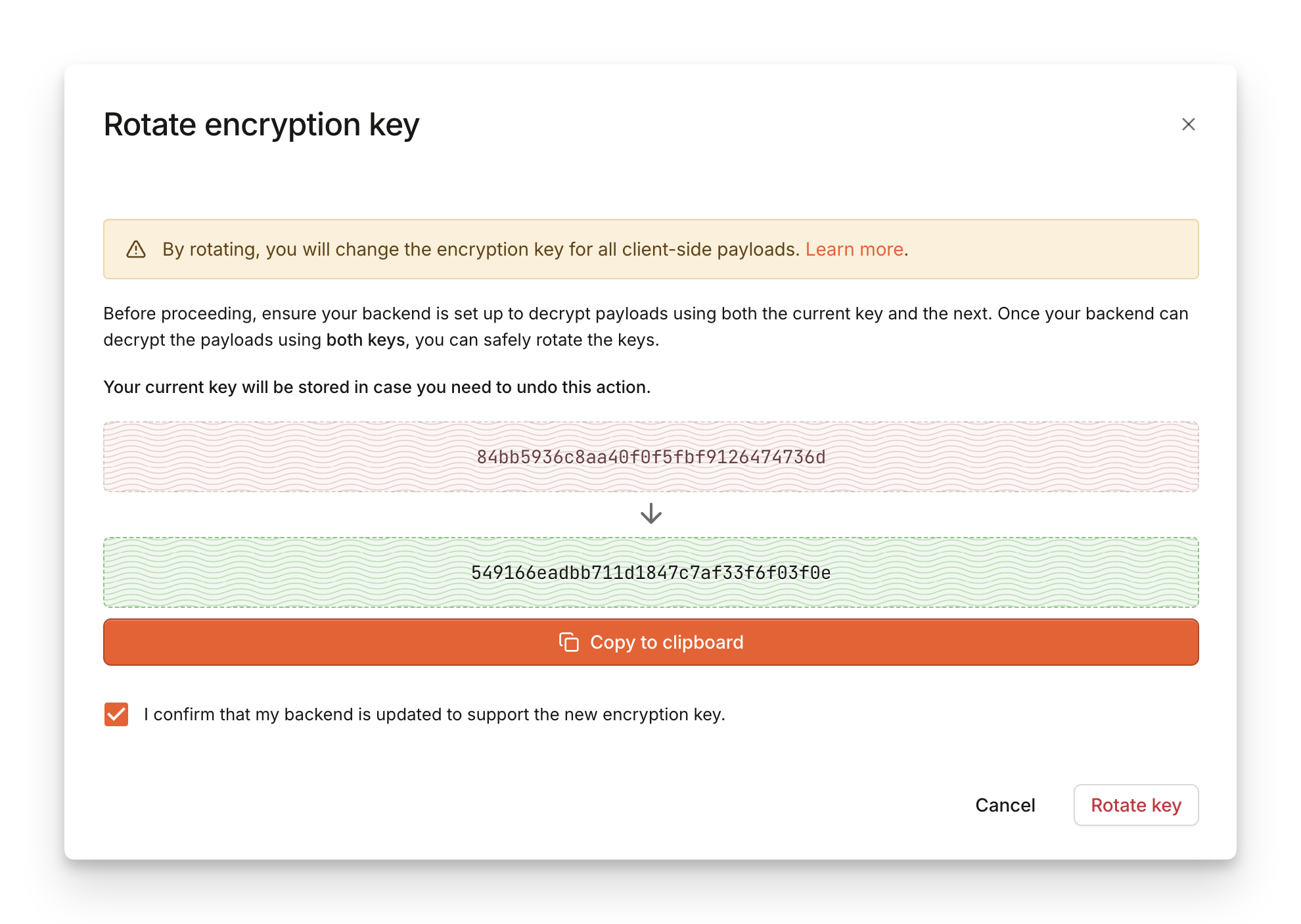 In case you accidentally finished a rotation too early, you can **Revert** back to the previous key you used before rotation.
1. Find the key you rotated, click `...` and select **Revert**.
2. In the dialog, you will find the **previous key** that you will be reverting to.
3. Click on **Revert** to confirm the action.
## Replay attack protection
**Sealed Client Results** don't add any protection against possible replay attacks. However, the feature makes it easy to implement replay attack protection.
With Sealed Client Results, you only need to check if the `event_id` retrieved from the `sealed_result` contains a unique and previously unseen value. Because the sealed payload cannot be modified, the `event_id` is always valid and genuine.
Additionally, you can also check the `timestamp` field to further validate the authenticity of the request. The time difference between `timestamp` and the current time should not surpass a reasonably low threshold.
## Disabling Sealed Client Results
You can turn off Sealed Client Results simply by disabling the **Encryption key** in the Dashboard.
**Disabling the Encryption key will immediately stop payload encryption**
Make sure that your integration can support handling unencrypted payload before you disable the encryption key.
If you've disabled the Encryption key by accident, you can re-enable the key to prevent any damage to your integration.
Once disabled, keys **cannot be deleted for 72 hours** from last deactivation. This is to make sure you can still reactivate keys in time if you need to update your integration.
If you need any assistance with disabling Sealed Client Results, please contact our [support team](https://fingerprint.com/support/).
**Implementation example**
See our VPN detection [use case demo](https://demo.fingerprint.com/vpn-detection?utm_content=sealed-client-results) and [tutorial](https://fingerprint.com/blog/vpn-detection-location-spoofing-fraud-prevention?utm_content=sealed-client-results) for a practical example of Sealed results implementation. The demo is open-source and available [on GitHub](https://github.com/fingerprintjs/fingerprintjs-pro-use-cases/tree/main/src/app/vpn-detection).
## Appendix: Payload format
After serializing `sealed_result` using `base64()`, the value is a **base64** representation of the following binary structure:
In case you accidentally finished a rotation too early, you can **Revert** back to the previous key you used before rotation.
1. Find the key you rotated, click `...` and select **Revert**.
2. In the dialog, you will find the **previous key** that you will be reverting to.
3. Click on **Revert** to confirm the action.
## Replay attack protection
**Sealed Client Results** don't add any protection against possible replay attacks. However, the feature makes it easy to implement replay attack protection.
With Sealed Client Results, you only need to check if the `event_id` retrieved from the `sealed_result` contains a unique and previously unseen value. Because the sealed payload cannot be modified, the `event_id` is always valid and genuine.
Additionally, you can also check the `timestamp` field to further validate the authenticity of the request. The time difference between `timestamp` and the current time should not surpass a reasonably low threshold.
## Disabling Sealed Client Results
You can turn off Sealed Client Results simply by disabling the **Encryption key** in the Dashboard.
**Disabling the Encryption key will immediately stop payload encryption**
Make sure that your integration can support handling unencrypted payload before you disable the encryption key.
If you've disabled the Encryption key by accident, you can re-enable the key to prevent any damage to your integration.
Once disabled, keys **cannot be deleted for 72 hours** from last deactivation. This is to make sure you can still reactivate keys in time if you need to update your integration.
If you need any assistance with disabling Sealed Client Results, please contact our [support team](https://fingerprint.com/support/).
**Implementation example**
See our VPN detection [use case demo](https://demo.fingerprint.com/vpn-detection?utm_content=sealed-client-results) and [tutorial](https://fingerprint.com/blog/vpn-detection-location-spoofing-fraud-prevention?utm_content=sealed-client-results) for a practical example of Sealed results implementation. The demo is open-source and available [on GitHub](https://github.com/fingerprintjs/fingerprintjs-pro-use-cases/tree/main/src/app/vpn-detection).
## Appendix: Payload format
After serializing `sealed_result` using `base64()`, the value is a **base64** representation of the following binary structure:
 * \[4 Bytes] Version header (currently set to `0x9E85DCED`)
* You can use the version header to check that you are processing the correct version of the payload but it isn't part of the encrypted section. In rare cases where we introduce breaking changes to the payload structure, the version header will also get a new value (along with a way to pick which version you want to consume to ensure a smooth transition between different versions).
* `/v4/events` Payload sealed with **AES-256-GCM**
* \[12 Bytes] Nonce/Initialization Vector
* Encrypted `/v4/events` JSON payload, compressed with [raw deflate](https://datatracker.ietf.org/doc/html/rfc1951)
* \[16 Bytes] Authentication Tag
See our reference implementation that unseals and decompresses the payload, while printing out debug output with intermediate steps:
```javascript Unsealing in Node.js theme={"theme":"github-dark-dimmed"}
import * as crypto from 'crypto'
import { promisify } from 'util'
import * as zlib from 'zlib'
const sealedResultBase64 = "noXc7SXO+mqeAGrvBMgObi/S0fXTpP3zupk8qFqsO/1zdtWCD169iLA3VkkZh9ICHpZ0oWRzqG0M9/TnCeKFohgBLqDp6O0zEfXOv6i5q++aucItznQdLwrKLP+O0blfb4dWVI8/aSbd4ELAZuJJxj9bCoVZ1vk+ShbUXCRZTD30OIEAr3eiG9aw00y1UZIqMgX6CkFlU9L9OnKLsNsyomPIaRHTmgVTI5kNhrnVNyNsnzt9rY7fUD52DQxJILVPrUJ1Q+qW7VyNslzGYBPG0DyYlKbRAomKJDQIkdj/Uwa6bhSTq4XYNVvbk5AJ/dGwvsVdOnkMT2Ipd67KwbKfw5bqQj/cw6bj8Cp2FD4Dy4Ud4daBpPRsCyxBM2jOjVz1B/lAyrOp8BweXOXYugwdPyEn38MBZ5oL4D38jIwR/QiVnMHpERh93jtgwh9Abza6i4/zZaDAbPhtZLXSM5ztdctv8bAb63CppLU541Kf4OaLO3QLvfLRXK2n8bwEwzVAqQ22dyzt6/vPiRbZ5akh8JB6QFXG0QJF9DejsIspKF3JvOKjG2edmC9o+GfL3hwDBiihYXCGY9lElZICAdt+7rZm5UxMx7STrVKy81xcvfaIp1BwGh/HyMsJnkE8IczzRFpLlHGYuNDxdLoBjiifrmHvOCUDcV8UvhSV+UAZtAVejdNGo5G/bz0NF21HUO4pVRPu6RqZIs/aX4hlm6iO/0Ru00ct8pfadUIgRcephTuFC2fHyZxNBC6NApRtLSNLfzYTTo/uSjgcu6rLWiNo5G7yfrM45RXjalFEFzk75Z/fu9lCJJa5uLFgDNKlU+IaFjArfXJCll3apbZp4/LNKiU35ZlB7ZmjDTrji1wLep8iRVVEGht/DW00MTok7Zn7Fv+MlxgWmbZB3BuezwTmXb/fNw=="
const sealedResult = Buffer.from(sealedResultBase64, 'base64')
const sealedHeader = Buffer.from('9E85DCED', 'hex')
const key = Buffer.from('p2PA7MGy5tx56cnyJaFZMr96BCFwZeHjZV2EqMvTq53=', 'base64')
if (sealedResult.subarray(0, sealedHeader.length).toString('hex') !== sealedHeader.toString('hex')) {
process.stderr.write('Wrong header\n')
process.exit(1)
}
const nonceLength = 12
const authTagLength = 16
const nonce = sealedResult.subarray(sealedHeader.length, sealedHeader.length + nonceLength)
const ciphertext = sealedResult.subarray(sealedHeader.length + nonceLength, -authTagLength)
const authTag = sealedResult.subarray(-authTagLength)
const decipher = crypto.createDecipheriv('aes-256-gcm', key, nonce).setAuthTag(authTag)
const compressed = Buffer.concat([decipher.update(ciphertext), decipher.final()])
process.stdout.write('Decrypted/compressed:\n')
process.stdout.write(compressed.toString('base64'))
process.stdout.write('\n')
const payload = await promisify(zlib.inflateRaw)(compressed)
process.stdout.write('\nDecompressed:\n')
process.stdout.write(payload)
process.stdout.write('\n')
```
```go Unsealing in Go theme={"theme":"github-dark-dimmed"}
package main
import (
"bytes"
"compress/flate"
"crypto/aes"
"crypto/cipher"
"encoding/base64"
"fmt"
"io"
"log"
"net/http"
"github.com/pkg/errors"
)
var (
sealHeader = []byte{0x9E, 0x85, 0xDC, 0xED}
ErrHeaderUnknown = errors.New("unknown header")
)
// The main function is not part of the unsealing process, it's a usage example
func main() {
base64Decode := func(input string) []byte {
output, err := base64.StdEncoding.DecodeString(input)
if err != nil {
panic(err)
}
return output
}
unsealResponse := func(w http.ResponseWriter, r *http.Request) {
b, err := io.ReadAll(r.Body)
if err != nil {
panic(err)
}
sealedResult := base64Decode(string(b))
// Encryption key generated in step 1
key := base64Decode("")
unsealed, err := Unseal(sealedResult , key)
if err != nil {
panic(err)
}
fmt.Println(string(unsealed))
w.WriteHeader(200)
}
http.HandleFunc("/sealed", unsealResponse)
log.Fatal(http.ListenAndServe(":3030", nil))
}
func Unseal(sealed, key []byte) ([]byte, error) {
if !bytes.Equal(sealed[:len(sealHeader)], sealHeader) {
return nil, ErrHeaderUnknown
}
compressed, err := decrypt(sealed[len(sealHeader):], key)
if err != nil {
return nil, errors.Wrap(err, "decrypt")
}
payload, err := decompress(compressed)
if err != nil {
return nil, errors.Wrap(err, "decompress")
}
return payload, nil
}
func decrypt(payload, key []byte) ([]byte, error) {
block, err := aes.NewCipher(key)
if err != nil {
return nil, errors.Wrap(err, "new cipher")
}
aesgcm, err := cipher.NewGCM(block)
if err != nil {
return nil, errors.Wrap(err, "new GCM")
}
if len(payload) < aesgcm.NonceSize() {
return nil, errors.New("nonce")
}
nonce, ciphertext := payload[:aesgcm.NonceSize()], payload[aesgcm.NonceSize():]
plaintext, err := aesgcm.Open(nil, nonce, ciphertext, nil)
if err != nil {
return nil, errors.Wrap(err, "aesgcm open")
}
return plaintext, nil
}
func decompress(compressed []byte) ([]byte, error) {
reader := flate.NewReader(bytes.NewReader(compressed))
defer reader.Close()
decompressed, err := io.ReadAll(reader)
if err != nil {
return nil, errors.Wrap(err, "inflated payload read all bytes")
}
return decompressed, nil
}
```
* \[4 Bytes] Version header (currently set to `0x9E85DCED`)
* You can use the version header to check that you are processing the correct version of the payload but it isn't part of the encrypted section. In rare cases where we introduce breaking changes to the payload structure, the version header will also get a new value (along with a way to pick which version you want to consume to ensure a smooth transition between different versions).
* `/v4/events` Payload sealed with **AES-256-GCM**
* \[12 Bytes] Nonce/Initialization Vector
* Encrypted `/v4/events` JSON payload, compressed with [raw deflate](https://datatracker.ietf.org/doc/html/rfc1951)
* \[16 Bytes] Authentication Tag
See our reference implementation that unseals and decompresses the payload, while printing out debug output with intermediate steps:
```javascript Unsealing in Node.js theme={"theme":"github-dark-dimmed"}
import * as crypto from 'crypto'
import { promisify } from 'util'
import * as zlib from 'zlib'
const sealedResultBase64 = "noXc7SXO+mqeAGrvBMgObi/S0fXTpP3zupk8qFqsO/1zdtWCD169iLA3VkkZh9ICHpZ0oWRzqG0M9/TnCeKFohgBLqDp6O0zEfXOv6i5q++aucItznQdLwrKLP+O0blfb4dWVI8/aSbd4ELAZuJJxj9bCoVZ1vk+ShbUXCRZTD30OIEAr3eiG9aw00y1UZIqMgX6CkFlU9L9OnKLsNsyomPIaRHTmgVTI5kNhrnVNyNsnzt9rY7fUD52DQxJILVPrUJ1Q+qW7VyNslzGYBPG0DyYlKbRAomKJDQIkdj/Uwa6bhSTq4XYNVvbk5AJ/dGwvsVdOnkMT2Ipd67KwbKfw5bqQj/cw6bj8Cp2FD4Dy4Ud4daBpPRsCyxBM2jOjVz1B/lAyrOp8BweXOXYugwdPyEn38MBZ5oL4D38jIwR/QiVnMHpERh93jtgwh9Abza6i4/zZaDAbPhtZLXSM5ztdctv8bAb63CppLU541Kf4OaLO3QLvfLRXK2n8bwEwzVAqQ22dyzt6/vPiRbZ5akh8JB6QFXG0QJF9DejsIspKF3JvOKjG2edmC9o+GfL3hwDBiihYXCGY9lElZICAdt+7rZm5UxMx7STrVKy81xcvfaIp1BwGh/HyMsJnkE8IczzRFpLlHGYuNDxdLoBjiifrmHvOCUDcV8UvhSV+UAZtAVejdNGo5G/bz0NF21HUO4pVRPu6RqZIs/aX4hlm6iO/0Ru00ct8pfadUIgRcephTuFC2fHyZxNBC6NApRtLSNLfzYTTo/uSjgcu6rLWiNo5G7yfrM45RXjalFEFzk75Z/fu9lCJJa5uLFgDNKlU+IaFjArfXJCll3apbZp4/LNKiU35ZlB7ZmjDTrji1wLep8iRVVEGht/DW00MTok7Zn7Fv+MlxgWmbZB3BuezwTmXb/fNw=="
const sealedResult = Buffer.from(sealedResultBase64, 'base64')
const sealedHeader = Buffer.from('9E85DCED', 'hex')
const key = Buffer.from('p2PA7MGy5tx56cnyJaFZMr96BCFwZeHjZV2EqMvTq53=', 'base64')
if (sealedResult.subarray(0, sealedHeader.length).toString('hex') !== sealedHeader.toString('hex')) {
process.stderr.write('Wrong header\n')
process.exit(1)
}
const nonceLength = 12
const authTagLength = 16
const nonce = sealedResult.subarray(sealedHeader.length, sealedHeader.length + nonceLength)
const ciphertext = sealedResult.subarray(sealedHeader.length + nonceLength, -authTagLength)
const authTag = sealedResult.subarray(-authTagLength)
const decipher = crypto.createDecipheriv('aes-256-gcm', key, nonce).setAuthTag(authTag)
const compressed = Buffer.concat([decipher.update(ciphertext), decipher.final()])
process.stdout.write('Decrypted/compressed:\n')
process.stdout.write(compressed.toString('base64'))
process.stdout.write('\n')
const payload = await promisify(zlib.inflateRaw)(compressed)
process.stdout.write('\nDecompressed:\n')
process.stdout.write(payload)
process.stdout.write('\n')
```
```go Unsealing in Go theme={"theme":"github-dark-dimmed"}
package main
import (
"bytes"
"compress/flate"
"crypto/aes"
"crypto/cipher"
"encoding/base64"
"fmt"
"io"
"log"
"net/http"
"github.com/pkg/errors"
)
var (
sealHeader = []byte{0x9E, 0x85, 0xDC, 0xED}
ErrHeaderUnknown = errors.New("unknown header")
)
// The main function is not part of the unsealing process, it's a usage example
func main() {
base64Decode := func(input string) []byte {
output, err := base64.StdEncoding.DecodeString(input)
if err != nil {
panic(err)
}
return output
}
unsealResponse := func(w http.ResponseWriter, r *http.Request) {
b, err := io.ReadAll(r.Body)
if err != nil {
panic(err)
}
sealedResult := base64Decode(string(b))
// Encryption key generated in step 1
key := base64Decode("")
unsealed, err := Unseal(sealedResult , key)
if err != nil {
panic(err)
}
fmt.Println(string(unsealed))
w.WriteHeader(200)
}
http.HandleFunc("/sealed", unsealResponse)
log.Fatal(http.ListenAndServe(":3030", nil))
}
func Unseal(sealed, key []byte) ([]byte, error) {
if !bytes.Equal(sealed[:len(sealHeader)], sealHeader) {
return nil, ErrHeaderUnknown
}
compressed, err := decrypt(sealed[len(sealHeader):], key)
if err != nil {
return nil, errors.Wrap(err, "decrypt")
}
payload, err := decompress(compressed)
if err != nil {
return nil, errors.Wrap(err, "decompress")
}
return payload, nil
}
func decrypt(payload, key []byte) ([]byte, error) {
block, err := aes.NewCipher(key)
if err != nil {
return nil, errors.Wrap(err, "new cipher")
}
aesgcm, err := cipher.NewGCM(block)
if err != nil {
return nil, errors.Wrap(err, "new GCM")
}
if len(payload) < aesgcm.NonceSize() {
return nil, errors.New("nonce")
}
nonce, ciphertext := payload[:aesgcm.NonceSize()], payload[aesgcm.NonceSize():]
plaintext, err := aesgcm.Open(nil, nonce, ciphertext, nil)
if err != nil {
return nil, errors.Wrap(err, "aesgcm open")
}
return plaintext, nil
}
func decompress(compressed []byte) ([]byte, error) {
reader := flate.NewReader(bytes.NewReader(compressed))
defer reader.Close()
decompressed, err := io.ReadAll(reader)
if err != nil {
return nil, errors.Wrap(err, "inflated payload read all bytes")
}
return decompressed, nil
}
```