> ## Documentation Index
> Fetch the complete documentation index at: https://docs.fingerprint.com/llms.txt
> Use this file to discover all available pages before exploring further.
# Quick Start Guide
> How to quickly add Fingerprint device intelligence to your website or mobile app.
## Install Fingerprint
[Sign up for a free trial](https://dashboard.fingerprint.com/signup?utm_source=/docs/quick-start-guide) to get your API key, no credit card is required.
Please make sure the following domains are allowed in your firewall:
* `https://fingerprint.com`
* `https://*.fingerprint.com`
* `https://api.fpjs.pro`
In the Dashboard, go to [API keys > Public](https://dashboard.fingerprint.com/api-keys) from the sidebar and copy your public API key to run the examples below.
You can [add the JavaScript agent](/docs/install-the-javascript-agent) to your website or add a native SDK to your [iOS](/docs/ios) or [Android](/docs/native-android-integration) app. The agent collects browser or device attributes, sends them to the Fingerprint backend, and receives a `visitor_id` for that browser or mobile device.
Let's start with JavaScript. You can install the agent using a package manager or our CDN.
```shell NPM theme={"theme":"github-dark-dimmed"}
npm install @fingerprint/agent
```
```shell yarn theme={"theme":"github-dark-dimmed"}
yarn add @fingerprint/agent
```
```shell PNPM theme={"theme":"github-dark-dimmed"}
pnpm add @fingerprint/agent
```
// Initialize the agent at application startup.
// Some ad blockers or browsers will block Fingerprint CDN URL.
// To fix this, use a custom subdomain or a proxy integration.
// (see info box below)
const fpPromise = import('https://fpjscdn.net/v4/${user.primaryBrowserToken ?? "PUBLIC_API_KEY"}')
.then(Fingerprint => Fingerprint.start({ region: "us" }));
// Get the visitor identifier when you need it.
fpPromise
.then(fp => fp.get())
.then(result => console.log(result.event_id, result.visitor_id));
`}
/>
console.log(result.event_id, result.visitor_id))`}
/>
> Note: Each workspace exists in a specific region. If you have chosen Europe or Asia as your [data region](/docs/regions), you must specify the [`region`](/reference/js-agent-v4-start-function#region) option as `eu` or `ap` in your agent configuration to match your workspace.
**Working with ad blockers and privacy-focused browsers**
Requests to Fingerprint APIs are often blocked by ad-blockers or privacy-focused browsers like Brave. Make sure to disable your ad blocker when trying out the examples above.
To identify 100% of visitors with maximum possible accuracy, use one of our cloud proxy integrations. See [protecting the JavaScript agent from ad blockers](/docs/protecting-the-javascript-agent-from-adblockers) for more details.
Open the page or app where you installed Fingerprint and wait a second. The script automatically runs on page load.
Now ensure the script is working as expected by visiting the [Events](https://dashboard.fingerprint.com/events) page. You should see a new event with the `event_id` field.
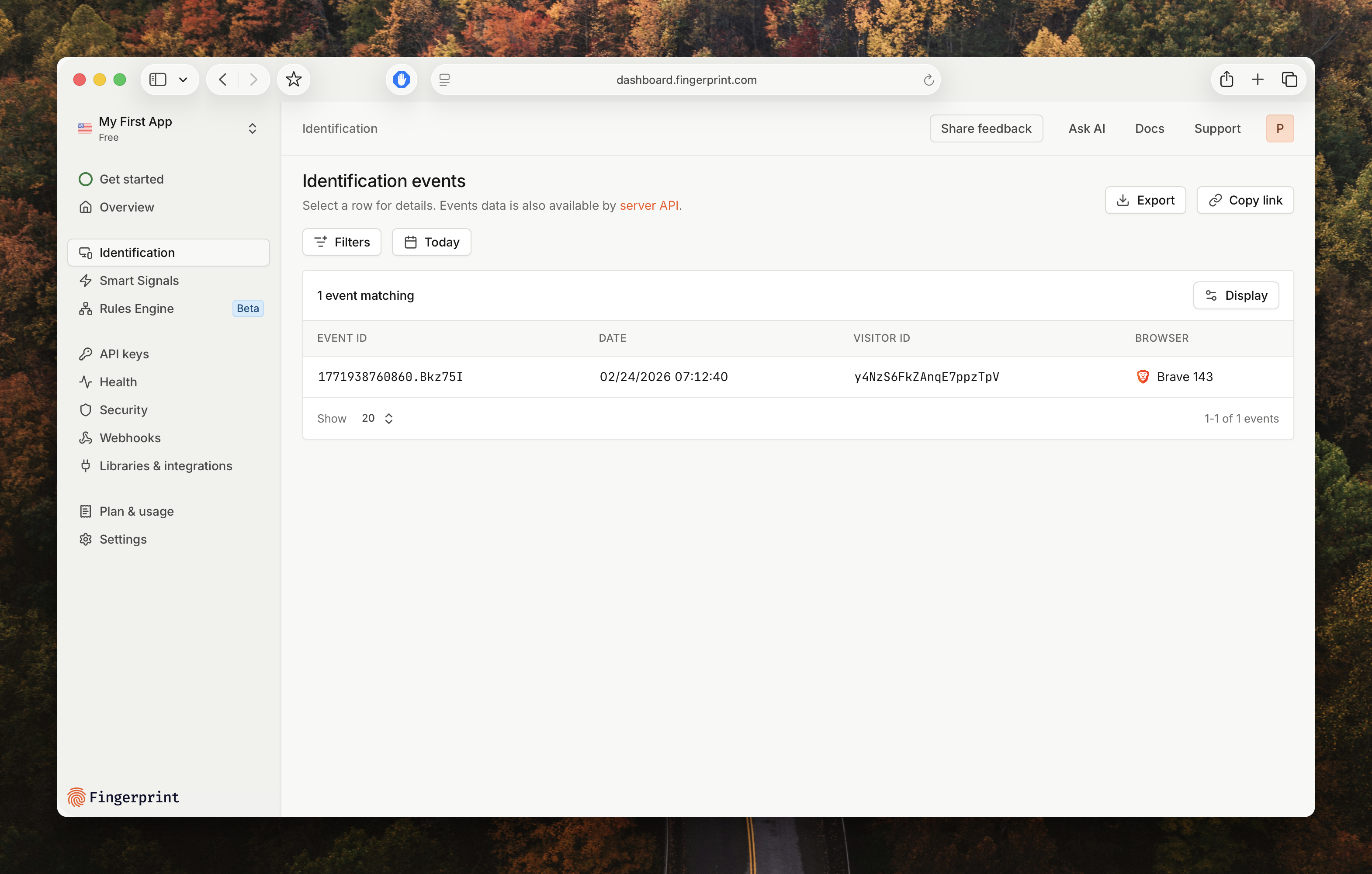
If you cannot set up Fingerprint right now, you can view the code and response in our browser sandbox environment.
[Open Stackblitz](https://stackblitz.com/edit/fpjs-pro-3-cdn?devtoolsheight=1000\&embed=1\&file=index.html\&hideExplorer=1\&hideNavigation=1\&theme=light)
## Access detailed insights about a visitor
[Smart Signals](/docs/smart-signals-introduction) are actionable device intelligence insights about your visitors. These include *Bot detection*, *VPN detection*, *Browser tampering detection*, and many more.
For security reasons, Smart Signals are unavailable in the [response](/reference/js-agent-v4-get-function#get-response) returned to the client agent. You can securely access them in a server-side environment using [Server API](/reference/server-api-v4), [Webhooks](/docs/webhooks), or [Sealed Client Results](/docs/sealed-client-results).
For example, to use the Server API:
You may skip this step if you already generated an identification event using the steps above.
Ensure your site or app has sent its first identification event, and then copy its `event_id`. You can find this field in the [Events](https://dashboard.fingerprint.com/events) page table.
Go to [API keys > Server API](https://dashboard.fingerprint.com/api-keys?type=api) from the sidebar and click **New secret key** to generate your key.
Visit the [API reference](/reference/server-api-v4-get-event) and paste your secret key as the Authorization header and `event_id` into the API explorer. This will return all information for that identification event, including Smart Signals.
You should see a response similar to the following:
```json Response expandable theme={"theme":"github-dark-dimmed"}
{
"event_id": "1708102555327.NLOjmg",
"linked_id": "somelinkedId",
"tags": {},
"timestamp": 1708102555327,
"url": "https://www.example.com/login",
"ip_address": "61.127.217.15",
"user_agent": "Mozilla/5.0 (Windows NT 6.1; Win64; x64) ....",
"client_referrer": "https://example.com/blog/my-article",
"browser_details": {
"browser_name": "Chrome",
"browser_major_version": "74",
"browser_full_version": "74.0.3729",
"os": "Windows",
"os_version": "7",
"device": "Other"
},
"identification": {
"visitor_id": "Ibk1527CUFmcnjLwIs4A9",
"confidence": {
"score": 0.97,
"version": "1.1"
},
"visitor_found": false,
"first_seen_at": 1708102555327,
"last_seen_at": 1708102555327
},
"supplementary_id_high_recall": {
"visitor_id": "3HNey93AkBW6CRbxV6xP",
"visitor_found": true,
"confidence": {
"score": 0.97,
"version": "1.1"
},
"first_seen_at": 1708102555327,
"last_seen_at": 1708102555327
},
"proximity": {
"id": "w1aTfd4MCvl",
"precision_radius": 10,
"confidence": 0.95
},
"bot": "not_detected",
"root_apps": false,
"emulator": false,
"ip_info": {
"v4": {
"address": "94.142.239.124",
"geolocation": {
"accuracy_radius": 20,
"latitude": 50.05,
"longitude": 14.4,
"postal_code": "150 00",
"timezone": "Europe/Prague",
"city_name": "Prague",
"country_code": "CZ",
"country_name": "Czechia",
"continent_code": "EU",
"continent_name": "Europe",
"subdivisions": [
{
"iso_code": "10",
"name": "Hlavni mesto Praha"
}
]
},
"asn": "7922",
"asn_name": "COMCAST-7922",
"asn_network": "73.136.0.0/13",
"asn_type": "isp",
"datacenter_result": true,
"datacenter_name": "DediPath"
},
"v6": {
"address": "2001:db8:3333:4444:5555:6666:7777:8888",
"geolocation": {
"accuracy_radius": 5,
"latitude": 49.982,
"longitude": 36.2566,
"postal_code": "10112",
"timezone": "Europe/Berlin",
"city_name": "Berlin",
"country_code": "DE",
"country_name": "Germany",
"continent_code": "EU",
"continent_name": "Europe",
"subdivisions": [
{
"iso_code": "BE",
"name": "Land Berlin"
}
]
},
"asn": "6805",
"asn_name": "Telefonica Germany",
"asn_network": "2a02:3100::/24",
"asn_type": "isp",
"datacenter_result": false,
"datacenter_name": ""
}
},
"ip_blocklist": {
"email_spam": false,
"attack_source": false,
"tor_node": false
},
"proxy": true,
"proxy_confidence": "low",
"proxy_details": {
"proxy_type": "residential",
"last_seen_at": 1708102555327
},
"vpn": false,
"vpn_confidence": "high",
"vpn_origin_timezone": "Europe/Berlin",
"vpn_origin_country": "unknown",
"vpn_methods": {
"timezone_mismatch": false,
"public_vpn": false,
"auxiliary_mobile": false,
"os_mismatch": false,
"relay": false
},
"incognito": false,
"tampering": false,
"tampering_details" : {
"anomaly_score": 0.1955,
"anti_detect_browser": false
},
"cloned_app": false,
"factory_reset_timestamp": 0,
"jailbroken": false,
"frida": false,
"privacy_settings": false,
"virtual_machine": false,
"location_spoofing": false,
"velocity": {
"distinct_ip": {
"5_minutes": 1,
"1_hour": 1,
"24_hours": 1
},
"distinct_country": {
"5_minutes": 1,
"1_hour": 2,
"24_hours": 2
},
"events": {
"5_minutes": 1,
"1_hour": 5,
"24_hours": 5
},
"ip_events": {
"5_minutes": 1,
"1_hour": 5,
"24_hours": 5
},
"distinct_ip_by_linked_id": {
"5_minutes": 1,
"1_hour": 5,
"24_hours": 5
},
"distinct_visitor_id_by_linked_id": {
"5_minutes": 1,
"1_hour": 5,
"24_hours": 5
}
},
"developer_tools": false,
"mitm_attack": false,
"sdk": {
"platform": "js",
"version": "3.11.10",
"integrations": [
{
"name": "fingerprint-pro-react",
"version": "3.11.10",
"subintegration": {
"name": "preact",
"version": "10.21.0"
}
}
]
},
"replayed": false,
"high_activity_device": false
}
```
```shell cURL theme={"theme":"github-dark-dimmed"}
curl --request GET \
--url https://api.fpjs.io/v4/events/ \
--header 'Authorization: Bearer SECRET_API_KEY' \
--header 'accept: application/json'
```
If you have chosen Europe or Asia as your [data region](/docs/regions), use `eu.api.fpjs.io` or `ap.api.fpjs.io` respectively.
We support several backend libraries to make it easier to work with the Fingerprint Server API and other resources. You can view available libraries from the [Integrations](https://dashboard.fingerprint.com/integrations) page in the Dashboard or below.
## Next steps
Maximize accuracy and protect your JavaScript snippet against ad blockers.
Join Fingerprint data with relevant details like user IDs for real-world use cases.
Prevent unauthorized key usage by configuring allow and block lists.