> ## Documentation Index
> Fetch the complete documentation index at: https://docs.fingerprint.com/llms.txt
> Use this file to discover all available pages before exploring further.
# Overview
> Fingerprint's device intelligence platform for Android devices.
Fingerprint's device intelligence platform is also available for Android devices. Our device intelligence platform for Android helps you to accurately identify the devices that interact with your mobile app and provides high-quality Smart Signals that will help you identify risky transactions before they happen.
To make integrations with mobile apps easier, we offer SDKs for apps built natively using Android as well as for apps built using multi-platform frameworks (e.g. React Native).
A Fingerprint account is required to be able to use the Fingerprint Identification SDK in your mobile apps. If you do not have an account yet, please [sign up](https://dashboard.fingerprintjs.com/signup) for one.
**Download our** [**demo
app**](https://play.google.com/store/apps/details?id=com.fingerprintjs.android.fpjs_pro_demo) from
Google Play to see Fingerprint in action!
## Device Identifier
When the Fingerprint Identification SDK is integrated into your mobile app, it will collect several attributes from the device. With the help of these attributes and additional algorithms, Fingerprint is able to provide a unique device identifier (i.e. `visitorId`) for every device on which your app is installed.
**Did you know?**
The device identifier generated by the Android SDK (embedded within your mobile app) will be different from the visitor ID generated by the Javascript agent (embedded within your website).
When compared with browsers, the identification accuracy is better for mobile devices because we identify mobile devices using signals that have higher longevity than those used for identifying browsers. But there are scenarios where a `visitorId` does not persist.
For your reference, we have listed various scenarios where a `visitorId` will remain the same before and after and where a new `visitorId` will be created.
| Scenario | Will I receive the same `visitorId` before and after? |
| --------------------------------------------------------------------------------------------------------------------------------------------------------- | -------------------------------------------------------------------------------------------------------------------------------------------------------- |
| The app or device is restarted | **Yes.** You will receive the same `visitorId` even after the app or device is restarted. |
| The app data/cache is cleared | **Yes.** You will receive the same `visitorId` even after the app's data/cache is cleared. |
| The app is uninstalled and re-installed again | **Yes.** You will receive the same `visitorId` even after the app is removed and installed again. |
| The device is factory reset | **Yes, in most of the devices.** After a factory reset, except for a few Android models, the `visitorId` remains the same. |
| The app is installed on [one or more profiles](https://source.android.com/docs/devices/admin/multi-user), that belong to a single user on the same device | **Yes.** You will receive the same `visitorId` even when the app is installed on multiple user profiles that belong to a single user on the same device. |
| The app is installed for [one or more user accounts, all belonging to the same device](https://source.android.com/docs/devices/admin/multi-user) | **Yes.** You will receive the same `visitorId` even when the app is installed on multiple user accounts that belong to the same device. |
| The app is cloned to a different app | **Yes**. The `visitorId` does not change even when the app is cloned numerous times or when the cloned app is installed on a different profile. |
## Android Smart Signals
Smart Signals are actionable device intelligence signals that help you to make informed decisions about the device and thus prevent fraud. These signals could be used as input to your machine learning models behind your fraud detection or risk mitigation engines. For example, when you know that a request is originating from a *rooted* device or from a recently *factory reset* device, you will be able to take additional precautionary security steps (e.g. multi-factor authentication).
For Android, the following Smart Signals are available:
* [Android Emulator Detection](/docs/smart-signals-reference#android-emulator-detection)
* [Cloned App Detection](/docs/smart-signals-reference#cloned-app-detection)
* [Factory Reset Detection](/docs/smart-signals-reference#factory-reset-detection)
* [Frida Detection](/docs/smart-signals-reference#frida-detection)
* [Geolocation Spoofing Detection](/docs/smart-signals-reference#geolocation-spoofing-detection)
* [IP Geolocation Detection](/docs/smart-signals-reference#ip-geolocation)
* [IP Blocklist Detection](/docs/smart-signals-reference#ip-blocklist-matching)
* [MitM Attack Detection](/docs/smart-signals-reference#mitm-attack-detection)
* [Rooted Device Detection](/docs/smart-signals-reference#rooted-device-detection)
* [Tampered Request Detection](/docs/smart-signals-reference#tampered-request-detection-for-mobile-apps)
* [VPN Detection](/docs/smart-signals-reference#vpn-detection-for-mobile-devices)
* [Developer Tools Detection](/docs/smart-signals-reference#developer-tools-detection-for-mobile-devices)
* [Smart Signals common for browsers and mobile devices](/docs/smart-signals-reference#smart-signals-common-for-browsers-and-mobile-devices)
These Smart Signals are available as part of our [Pro Plus and Enterprise plans](https://fingerprint.com/pricing/). If you are interested in one or more of these signals, then please [contact our support team](https://fingerprint.com/support/) to enable them for you. Signing up for an Enterprise plan does not automatically enable these signals.
## Fingerprint Identification SDK for Android
### Current Version: [2.17.0](/docs/changelog-android-sdk#july-2026)
For release notes and older versions, visit our [Changelog for Android SDK](https://docs.fingerprint.com/docs/changelog-android-sdk#june-2026) page.
### Supported Versions
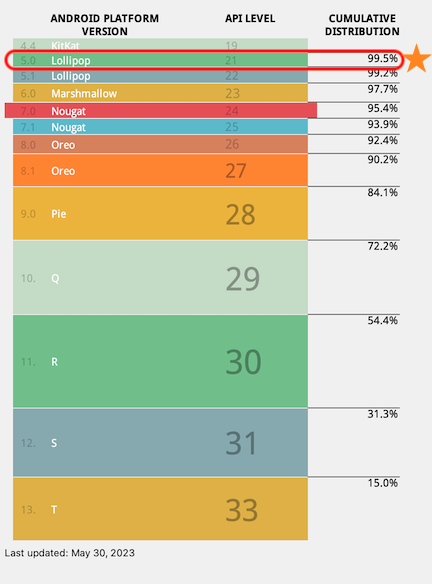
The minimum version that the Fingerprint Identification SDK for Android supports is [Marshmallow](https://developer.android.com/about/versions/marshmallow), [API Level 23](https://developer.android.com/tools/releases/platforms#6.0) starting [Android SDK 2.11.0+](/docs/changelog-android-sdk#v2-11-0). Per Google, this will allow your app to be compatible with a wide variety of active Android devices.
 ### Required Permissions
Fingerprint Identification SDK for Android requires the following **normal** permissions, without which the SDK cannot function properly. These permissions are required to identify the device and provide additional intelligence.
* [`android.permission.INTERNET`](https://developer.android.com/reference/android/Manifest.permission#INTERNET)
* `com.google.android.providers.gsf.permission.READ_GSERVICES`
Unlike the runtime permissions (*aka* dangerous permissions), these permissions do not require consent from the user. See [Permissions on Android](https://developer.android.com/guide/topics/permissions/overview) to learn more about the different types of permissions.
### Getting Started Guides
Our Getting Started guides are aimed at helping you to easily integrate our SDK with your apps.
* For native Android apps, see [Mobile SDKs > Android](/docs/android-sdk) and our [Android quickstart](/docs/android-quickstart).
* For apps built using Flutter, see our [Flutter SDK on GitHub](https://github.com/fingerprintjs/fingerprintjs-pro-flutter) and our [Flutter quickstart](/docs/flutter-quickstart).
* For apps built using React Native, see our [React Native SDK on GitHub](https://github.com/fingerprintjs/react) and our [React Native quickstart](/docs/react-native-quickstart).
## Data Safety Requirements for Google Play
For every app that is uploaded to the Google Play Store, Google requires that the app's privacy and security practices are made available to all its users. For this reason, when an app (or a new version) is uploaded to the Play Store, Google requires app developers to fill out a data safety form. See [Provide information for Google Play's Data safety section](https://support.google.com/googleplay/android-developer/answer/10787469?hl=en) for more information.
If your app includes our Android SDK, then you can use the following as a reference to fill out the data safety questionnaire:
### Section: Data collection and security
1. *Does your app collect or share any of the required user data types?* **Yes**
2. *Is all of the user data collected by your app encrypted in transit?* **Yes**
### Section: Data types
1. *Select all of the user data types collected or shared by your app*
1. **App info and performance -> Diagnostics**
2. **Device or other IDs.**
3. **Location -> Precise and Approximate Location** (collected since [Android SDK v2.10.0+](https://docs.fingerprint.com/docs/changelog-android-sdk#september-2025); requires user consent for permissions)
### Section: Data usage and handling
| Question | App info and performance > Diagnostics | Device or other IDs | Precise and Approximate Location |
| --------------------------------------------------------------------------------- | ----------------------------------------------------------------------- | ----------------------------------------------------------------------- | ------------------------------------------------------------- |
| *Is this data collected, shared, or both?* | Collected | Collected | Collected |
| *Is this data processed ephemerally?* | No, this collected data is not processed ephemerally | No, this collected data is not processed ephemerally | No, this collected data is not processed ephemerally |
| *Is this data required for your app, or can users choose whether it's collected?* | Data collection is required (users can't turn off this data collection) | Data collection is required (users can't turn off this data collection) | Location data collection is optional (your app controls this) |
| *Why is this user data collected?* | Analytics | Fraud Prevention, Security, and Compliance | Fraud Prevention, Security, and Compliance |
Note: The Data sharing section in the [Google Play Data Safety](https://support.google.com/googleplay/android-developer/answer/10787469#zippy=%2Cdata-sharing) form can be left empty. Per Google's policy, data transferred to a service provider that processes it on the developer's behalf - in compliance with the developer's instructions, contractual terms, and privacy policies - does not need to be declared as "shared." As Fingerprint acts as a data processor under GDPR (and a service provider under Google's definition), data sent to Fingerprint does not constitute "data sharing" for the purposes of this form.
### Google Play Compatibility Notes
The Fingerprint Android SDK may not be compatible with **[Google Play's Automatic Integrity Protection](https://developer.android.com/google/play/integrity/overview)**. If your app uses Google Play's integrity protection, we recommend reviewing compatibility before enabling this feature. If both are enabled, this may result in false positives or unexpected app behavior.
## FingerprintJS-Android: Open-source identification for Android
We also provide a lightweight, open-source library called [fingerprintjs-android](https://github.com/fingerprintjs/fingerprintjs-android) which is available to use for free by everyone. Our commercial SDK, Fingerprint Identification for Android, is based on our well-maintained, free, open-source library.
Compared to the open-source library, our commercial SDK collects many more attributes from the device. It also uses advanced fingerprinting and matching algorithms to create a unique device identifier.
For your better understanding, here is a complete set of differences between our open-source library (`fingerprintjs-android`) and our commercial SDK (`fingerprint-android-pro`).
| | FingerprintJS-Android(fingerprintjs-android) | Fingerprint Identification for Android(fingerprint-android-pro) |
| ---------------------------------------------------------------------------- | ------------------------------------------------------------------------------------ | ------------------------------------------------------------------------------------------- |
| Core Features | | |
| **Attributes collected from the device** | Basic (*e.g. Android ID, GSF ID, model*) | Advanced. Lot more attributes, in addition to those collected by the open-source library. |
| **ID Type** | Device ID or a *fingerprint* that is a hash of the collected attributes | A single *visitorId* that is computed using advanced fingerprinting and matching algorithms |
| **ID Origin** | Attributes are processed only within the library. External servers are not involved. | Attributes are processed on external servers |
| **ID Lifetime** | Only up to a few weeks | Lasts several months and sometimes even years |
| **ID Collisions** | Common | Very rare |
| Support for multi-platform frameworks | | |
| **Flutter** | - | **✓** |
| **React Native** | - | **✓** |
| Advanced Features | | |
| **Server API and Webhooks**\*(Build flexible workflows)\* | - | **✓** |
| **Mobile Smart Signals**\*(VPN Detection, Factory Reset, App Cloners, etc)\* | - | **✓** |
| **Geolocation**\*(Based on IP address)\* | - | **✓** |
| Operations | | |
| **Data security** | Depends on your infrastructure | Encrypted at rest |
| **Storage** | Depends on your infrastructure | Unlimited up to 1 year |
| **Regions** | Depends on your infrastructure | Global, EU and Asia data centers |
| **Compliance** | Depends on your infrastructure | Compliant\*\*\* with GDPR, CCPA, SOC 2 Type II, and ISO 27001 |
| **SLA** | SLA is not provided | 99.9% Uptime |
| **Support** | GitHub Issues/Questions. Response times varies. | Dedicated support team that responds to chat, email, and calls within 1 business day |
| How to get started? | [Get it on GitHub](https://github.com/fingerprintjs/fingerprintjs-android) | [Sign up for a free 14-day trial](https://dashboard.fingerprintjs.com/signup/) |
\*\*In comparison to fingerprints, VisitorIDs are more accurate and stable identifiers because they are deduplicated, are processed further on the server, and utilize fuzzy matching. On the other hand, fingerprint hashes become unstable across time intervals greater than 2 weeks because they rely on an exact match of all browser attributes.
\*\*\*The company, Fingerprint, in its role as data processor is compliant with GDPR, CCPA and SOC 2 Type II. It is also ISO 27001 certified. As a data controller, it is still your responsibility to be compliant with GDPR and CCPA and use the identification result for legitimate purposes.
***
[Understanding privacy manifest files](/docs/mobile-devices-understanding-privacy-manifest-files)
### Required Permissions
Fingerprint Identification SDK for Android requires the following **normal** permissions, without which the SDK cannot function properly. These permissions are required to identify the device and provide additional intelligence.
* [`android.permission.INTERNET`](https://developer.android.com/reference/android/Manifest.permission#INTERNET)
* `com.google.android.providers.gsf.permission.READ_GSERVICES`
Unlike the runtime permissions (*aka* dangerous permissions), these permissions do not require consent from the user. See [Permissions on Android](https://developer.android.com/guide/topics/permissions/overview) to learn more about the different types of permissions.
### Getting Started Guides
Our Getting Started guides are aimed at helping you to easily integrate our SDK with your apps.
* For native Android apps, see [Mobile SDKs > Android](/docs/android-sdk) and our [Android quickstart](/docs/android-quickstart).
* For apps built using Flutter, see our [Flutter SDK on GitHub](https://github.com/fingerprintjs/fingerprintjs-pro-flutter) and our [Flutter quickstart](/docs/flutter-quickstart).
* For apps built using React Native, see our [React Native SDK on GitHub](https://github.com/fingerprintjs/react) and our [React Native quickstart](/docs/react-native-quickstart).
## Data Safety Requirements for Google Play
For every app that is uploaded to the Google Play Store, Google requires that the app's privacy and security practices are made available to all its users. For this reason, when an app (or a new version) is uploaded to the Play Store, Google requires app developers to fill out a data safety form. See [Provide information for Google Play's Data safety section](https://support.google.com/googleplay/android-developer/answer/10787469?hl=en) for more information.
If your app includes our Android SDK, then you can use the following as a reference to fill out the data safety questionnaire:
### Section: Data collection and security
1. *Does your app collect or share any of the required user data types?* **Yes**
2. *Is all of the user data collected by your app encrypted in transit?* **Yes**
### Section: Data types
1. *Select all of the user data types collected or shared by your app*
1. **App info and performance -> Diagnostics**
2. **Device or other IDs.**
3. **Location -> Precise and Approximate Location** (collected since [Android SDK v2.10.0+](https://docs.fingerprint.com/docs/changelog-android-sdk#september-2025); requires user consent for permissions)
### Section: Data usage and handling
| Question | App info and performance > Diagnostics | Device or other IDs | Precise and Approximate Location |
| --------------------------------------------------------------------------------- | ----------------------------------------------------------------------- | ----------------------------------------------------------------------- | ------------------------------------------------------------- |
| *Is this data collected, shared, or both?* | Collected | Collected | Collected |
| *Is this data processed ephemerally?* | No, this collected data is not processed ephemerally | No, this collected data is not processed ephemerally | No, this collected data is not processed ephemerally |
| *Is this data required for your app, or can users choose whether it's collected?* | Data collection is required (users can't turn off this data collection) | Data collection is required (users can't turn off this data collection) | Location data collection is optional (your app controls this) |
| *Why is this user data collected?* | Analytics | Fraud Prevention, Security, and Compliance | Fraud Prevention, Security, and Compliance |
Note: The Data sharing section in the [Google Play Data Safety](https://support.google.com/googleplay/android-developer/answer/10787469#zippy=%2Cdata-sharing) form can be left empty. Per Google's policy, data transferred to a service provider that processes it on the developer's behalf - in compliance with the developer's instructions, contractual terms, and privacy policies - does not need to be declared as "shared." As Fingerprint acts as a data processor under GDPR (and a service provider under Google's definition), data sent to Fingerprint does not constitute "data sharing" for the purposes of this form.
### Google Play Compatibility Notes
The Fingerprint Android SDK may not be compatible with **[Google Play's Automatic Integrity Protection](https://developer.android.com/google/play/integrity/overview)**. If your app uses Google Play's integrity protection, we recommend reviewing compatibility before enabling this feature. If both are enabled, this may result in false positives or unexpected app behavior.
## FingerprintJS-Android: Open-source identification for Android
We also provide a lightweight, open-source library called [fingerprintjs-android](https://github.com/fingerprintjs/fingerprintjs-android) which is available to use for free by everyone. Our commercial SDK, Fingerprint Identification for Android, is based on our well-maintained, free, open-source library.
Compared to the open-source library, our commercial SDK collects many more attributes from the device. It also uses advanced fingerprinting and matching algorithms to create a unique device identifier.
For your better understanding, here is a complete set of differences between our open-source library (`fingerprintjs-android`) and our commercial SDK (`fingerprint-android-pro`).
| | FingerprintJS-Android(fingerprintjs-android) | Fingerprint Identification for Android(fingerprint-android-pro) |
| ---------------------------------------------------------------------------- | ------------------------------------------------------------------------------------ | ------------------------------------------------------------------------------------------- |
| Core Features | | |
| **Attributes collected from the device** | Basic (*e.g. Android ID, GSF ID, model*) | Advanced. Lot more attributes, in addition to those collected by the open-source library. |
| **ID Type** | Device ID or a *fingerprint* that is a hash of the collected attributes | A single *visitorId* that is computed using advanced fingerprinting and matching algorithms |
| **ID Origin** | Attributes are processed only within the library. External servers are not involved. | Attributes are processed on external servers |
| **ID Lifetime** | Only up to a few weeks | Lasts several months and sometimes even years |
| **ID Collisions** | Common | Very rare |
| Support for multi-platform frameworks | | |
| **Flutter** | - | **✓** |
| **React Native** | - | **✓** |
| Advanced Features | | |
| **Server API and Webhooks**\*(Build flexible workflows)\* | - | **✓** |
| **Mobile Smart Signals**\*(VPN Detection, Factory Reset, App Cloners, etc)\* | - | **✓** |
| **Geolocation**\*(Based on IP address)\* | - | **✓** |
| Operations | | |
| **Data security** | Depends on your infrastructure | Encrypted at rest |
| **Storage** | Depends on your infrastructure | Unlimited up to 1 year |
| **Regions** | Depends on your infrastructure | Global, EU and Asia data centers |
| **Compliance** | Depends on your infrastructure | Compliant\*\*\* with GDPR, CCPA, SOC 2 Type II, and ISO 27001 |
| **SLA** | SLA is not provided | 99.9% Uptime |
| **Support** | GitHub Issues/Questions. Response times varies. | Dedicated support team that responds to chat, email, and calls within 1 business day |
| How to get started? | [Get it on GitHub](https://github.com/fingerprintjs/fingerprintjs-android) | [Sign up for a free 14-day trial](https://dashboard.fingerprintjs.com/signup/) |
\*\*In comparison to fingerprints, VisitorIDs are more accurate and stable identifiers because they are deduplicated, are processed further on the server, and utilize fuzzy matching. On the other hand, fingerprint hashes become unstable across time intervals greater than 2 weeks because they rely on an exact match of all browser attributes.
\*\*\*The company, Fingerprint, in its role as data processor is compliant with GDPR, CCPA and SOC 2 Type II. It is also ISO 27001 certified. As a data controller, it is still your responsibility to be compliant with GDPR and CCPA and use the identification result for legitimate purposes.
***
[Understanding privacy manifest files](/docs/mobile-devices-understanding-privacy-manifest-files)