> ## Documentation Index
> Fetch the complete documentation index at: https://docs.fingerprint.com/llms.txt
> Use this file to discover all available pages before exploring further.
# Overview
> Learn how to install and use the JavaScript agent to identify visitors.
The Fingerprint [JavaScript agent](/reference/js-agent-v4) is a high-performance JavaScript library that collects multiple device and browser signals and sends them to the Fingerprint Platform API for visitor identification and device intelligence analysis. If you are looking for equivalent SDKs for mobile devices, see [Android](/docs/native-android-integration) and [iOS](/docs/ios).
This guide focuses on how to install the JavaScript agent. To explore the JavaScript agent API further, see its [API reference](/reference/js-agent-v4).
You have several options for how to install the JavaScript agent on your website:
* Import the agent directly from a CDN (fastest for a quick test).
* Install the agent loader using NPM (includes TypeScript support).
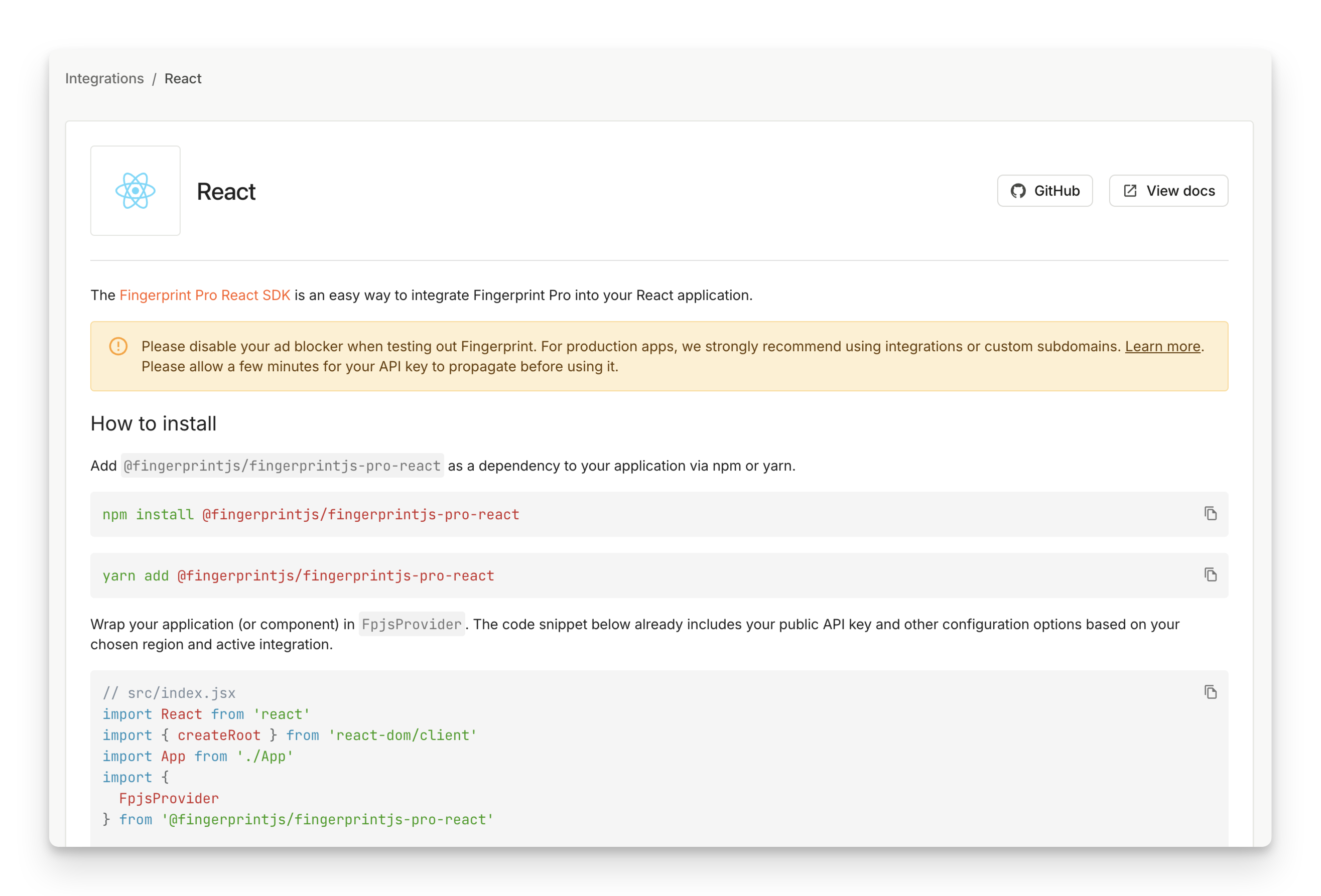
* Use a frontend SDK for your specific framework like React, Vue, Svelte, or Angular (recommended, includes built-in caching strategies and framework-specific APIs).
**Sandboxed iframe not supported**
Do not run the JavaScript agent inside a [sandboxed](https://developer.mozilla.org/en-US/docs/Web/HTML/Element/iframe#sandbox) iframe. This setup is not supported and may prevent the agent from functioning properly.
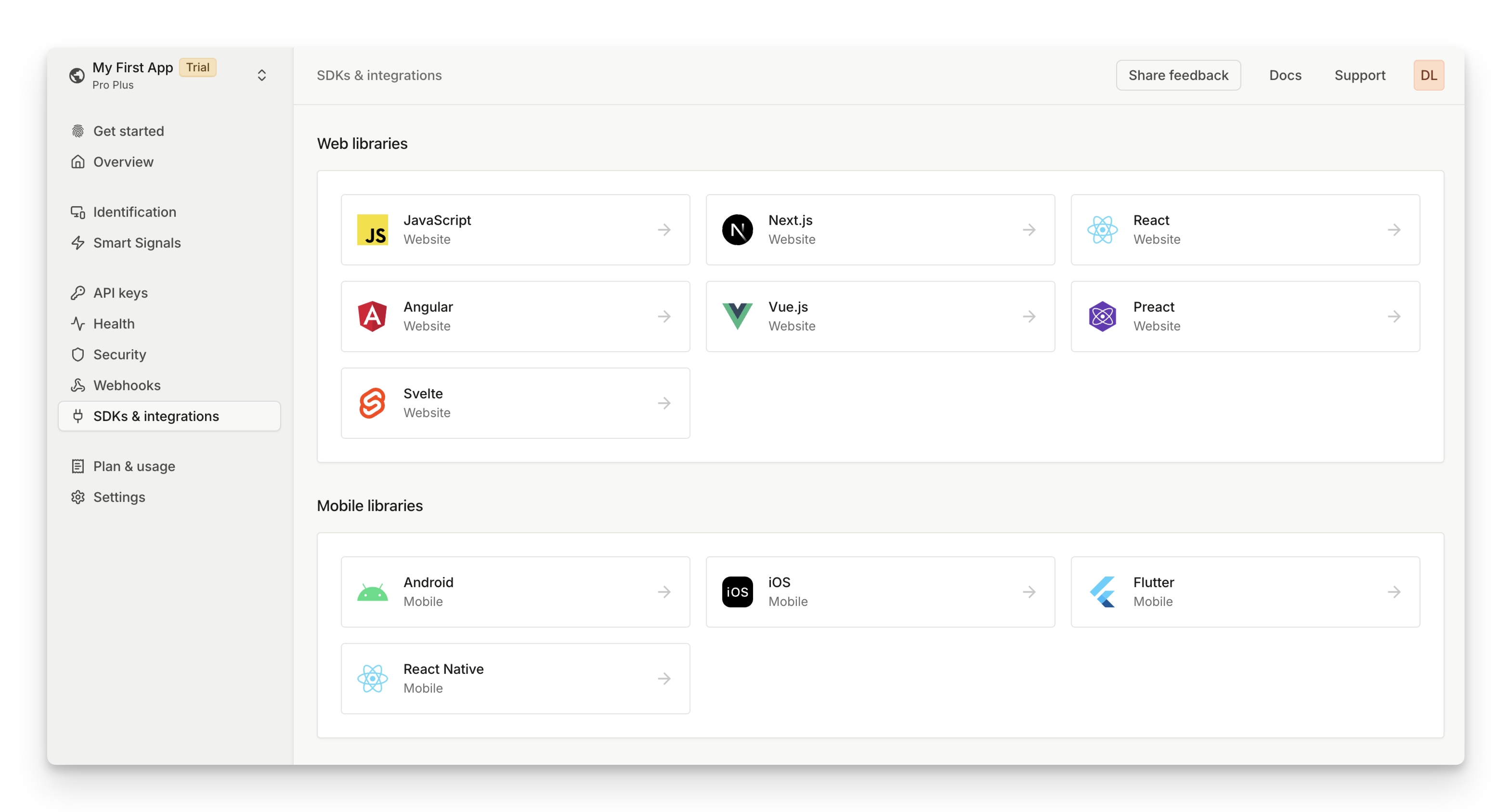
Each option is described in more detail below. They all require a Fingerprint Public API key, which you can get by navigating to [**Dashboard**](https://dashboard.fingerprint.com/) > **[API keys](https://dashboard.fingerprint.com/api-keys)**.
You can also see **[SDKs & integrations](https://dashboard.fingerprint.com/integrations)** for code snippets of all the options already personalized with your public API key, [region](/docs/regions), and [proxy integration](/docs/protecting-the-javascript-agent-from-adblockers).
 ## Importing from a CDN
This is the easiest way to start. It's also known as ESM import.
1. Add the HTML code below to your page.
2. Use your public API key at the end of the URL, right after `/v4/`, for example: `https://fpjscdn.net/v4/PUBLIC_API_KEY`.
// Initialize the agent once at web application startup.
// Alternatively initialize as early on the page as possible.
const Fingerprint = await import('https://fpjscdn.net/v4/${user.primaryBrowserToken ?? "PUBLIC_API_KEY"}')
const fp = Fingerprint.start()
// Analyze the visitor when necessary.
const result = await fp.get()
console.log(result.event_id, result.visitor_id)
`}
/>
**Always use the latest JavaScript agent**
Do not copy the JavaScript agent code from `fpjscdn.net` to your codebase.
We routinely update the JavaScript agent to keep up with the latest browser releases. Always download the latest JavaScript agent, otherwise you may miss critical updates, leading to degraded accuracy or service disruption. If you absolutely must host all JavaScript resources yourself, please reach out to our support at [support@fingerprint.com](mailto:support@fingerprint.com?subject=I%20want%20to%20keep%20JS%20Agent%20code%20on%20my%20server) for a solution.
## Installing the agent loader using NPM
The Fingerprint NPM package works as a **loader** for the JavaScript agent. It does not contain the JavaScript agent code itself; instead, it's responsible for downloading the agent from a CDN at runtime.
We routinely update the JavaScript agent to keep up with the latest browser releases. The NPM package ensures your website always uses the latest, most accurate version of the agent without frequently updating your NPM dependencies and redeploying your application.
* The NPM package includes TypeScript types for a better development experience.
* The package is compatible with various module bundlers such as [Webpack](https://webpack.js.org) and [Rollup](https://rollupjs.org).
To use the NPM package:
1. Install the [@fingerprint/agent](https://www.npmjs.com/package/@fingerprint/agent) NPM package using your favorite package manager.
```shell NPM theme={"theme":"github-dark-dimmed"}
npm install @fingerprint/agent
```
```shell Yarn theme={"theme":"github-dark-dimmed"}
yarn add @fingerprint/agent
```
```shell PNPM theme={"theme":"github-dark-dimmed"}
pnpm add @fingerprint/agent
```
2. Import the package into your code:
console.log(result.event_id, result.visitor_id))
`}
/>
3. Pass your public API key as `apiKey` into the `start()` function.
You can use your preferred [import syntax](https://developer.mozilla.org/en-US/docs/Web/JavaScript/Reference/Statements/import#forms_of_import_declarations). However, using a namespace import (`import * as Fingerprint from`) instead of a default import ( `import Fingerprint from`) will result in a slightly smaller bundle size due to improved [tree-shaking](https://en.wikipedia.org/wiki/Tree_shaking).
If you use a server-side rendering framework, make sure the NPM package code runs only in the browser, not on the server. For more information, see [Usage with server-side rendering frameworks](/docs/usage-with-server-side-rendering-frameworks).
## Using a framework-specific SDK
We have SDKs for the following frameworks:
* [React](https://github.com/fingerprintjs/react) (includes support for Preact, Next)
* [Vue](https://github.com/fingerprintjs/vue)
* [Angular](https://github.com/fingerprintjs/angular)
* [Svelte](https://github.com/fingerprintjs/svelte)
The SDKs wrap the agent loader NPM package described above, meaning the latest fingerprinting logic is still downloaded from a CDN at runtime. The SDKs expose the JavaScript agent functionality through framework-specific APIs (for example, a provider component and a hook in React). They also have caching and other best practices built in.
If you can, we recommend using one of the framework SDKs above. You can go to **Dashboard** > **[SDKs & integrations](https://dashboard.fingerprint.com/integrations)** to get started with personalized code snippets for the SDKs.
## Importing from a CDN
This is the easiest way to start. It's also known as ESM import.
1. Add the HTML code below to your page.
2. Use your public API key at the end of the URL, right after `/v4/`, for example: `https://fpjscdn.net/v4/PUBLIC_API_KEY`.
// Initialize the agent once at web application startup.
// Alternatively initialize as early on the page as possible.
const Fingerprint = await import('https://fpjscdn.net/v4/${user.primaryBrowserToken ?? "PUBLIC_API_KEY"}')
const fp = Fingerprint.start()
// Analyze the visitor when necessary.
const result = await fp.get()
console.log(result.event_id, result.visitor_id)
`}
/>
**Always use the latest JavaScript agent**
Do not copy the JavaScript agent code from `fpjscdn.net` to your codebase.
We routinely update the JavaScript agent to keep up with the latest browser releases. Always download the latest JavaScript agent, otherwise you may miss critical updates, leading to degraded accuracy or service disruption. If you absolutely must host all JavaScript resources yourself, please reach out to our support at [support@fingerprint.com](mailto:support@fingerprint.com?subject=I%20want%20to%20keep%20JS%20Agent%20code%20on%20my%20server) for a solution.
## Installing the agent loader using NPM
The Fingerprint NPM package works as a **loader** for the JavaScript agent. It does not contain the JavaScript agent code itself; instead, it's responsible for downloading the agent from a CDN at runtime.
We routinely update the JavaScript agent to keep up with the latest browser releases. The NPM package ensures your website always uses the latest, most accurate version of the agent without frequently updating your NPM dependencies and redeploying your application.
* The NPM package includes TypeScript types for a better development experience.
* The package is compatible with various module bundlers such as [Webpack](https://webpack.js.org) and [Rollup](https://rollupjs.org).
To use the NPM package:
1. Install the [@fingerprint/agent](https://www.npmjs.com/package/@fingerprint/agent) NPM package using your favorite package manager.
```shell NPM theme={"theme":"github-dark-dimmed"}
npm install @fingerprint/agent
```
```shell Yarn theme={"theme":"github-dark-dimmed"}
yarn add @fingerprint/agent
```
```shell PNPM theme={"theme":"github-dark-dimmed"}
pnpm add @fingerprint/agent
```
2. Import the package into your code:
console.log(result.event_id, result.visitor_id))
`}
/>
3. Pass your public API key as `apiKey` into the `start()` function.
You can use your preferred [import syntax](https://developer.mozilla.org/en-US/docs/Web/JavaScript/Reference/Statements/import#forms_of_import_declarations). However, using a namespace import (`import * as Fingerprint from`) instead of a default import ( `import Fingerprint from`) will result in a slightly smaller bundle size due to improved [tree-shaking](https://en.wikipedia.org/wiki/Tree_shaking).
If you use a server-side rendering framework, make sure the NPM package code runs only in the browser, not on the server. For more information, see [Usage with server-side rendering frameworks](/docs/usage-with-server-side-rendering-frameworks).
## Using a framework-specific SDK
We have SDKs for the following frameworks:
* [React](https://github.com/fingerprintjs/react) (includes support for Preact, Next)
* [Vue](https://github.com/fingerprintjs/vue)
* [Angular](https://github.com/fingerprintjs/angular)
* [Svelte](https://github.com/fingerprintjs/svelte)
The SDKs wrap the agent loader NPM package described above, meaning the latest fingerprinting logic is still downloaded from a CDN at runtime. The SDKs expose the JavaScript agent functionality through framework-specific APIs (for example, a provider component and a hook in React). They also have caching and other best practices built in.
If you can, we recommend using one of the framework SDKs above. You can go to **Dashboard** > **[SDKs & integrations](https://dashboard.fingerprint.com/integrations)** to get started with personalized code snippets for the SDKs.
 If your application uses a different frontend framework, use the [NPM agent loader](#installing-the-agent-loader-using-npm) directly - it includes the same built-in caching mechanism and works with any framework. The older [`fingerprintjs-pro-spa`](https://github.com/fingerprintjs/fingerprintjs-pro-spa) wrapper is [deprecated in v4](/docs/generic-js-agent-wrapper-for-spas) now that caching is built into the agent.
## Configuring the agent
No matter which installation methods you pick above, you need to initialize the agent with your API key, region, proxy endpoints, and other load options. See the [JavaScript Agent API Reference](/reference/js-agent-v4-start-function#start-options) for a detailed description of all `start()` options. Most users will need the following three options:
* [`apiKey`](/reference/js-agent-v4-start-function#apikey): Go to **Dashboard** > **[API keys](https://dashboard.fingerprint.com/api-keys)** to find your public API key.
* [`region`](/reference/js-agent-v4-start-function#region): If you choose to store your data in the EU or Asia Pacific [region](/docs/regions), you need to specify it in the region `start()` option.
* [`endpoints`](/reference/js-agent-v4-start-function#endpoints): Requests to Fingerprint CDN and API can be blocked by ad blockers. For maximum coverage, we recommend proxying Fingerprint requests through your own domain or subdomain. See [Proxy integrations](/docs/protecting-the-javascript-agent-from-adblockers) for more information. Once you have a proxy integration in place, you will use the `endpoints` start option to specify the proxy endpoints for agent download and identification requests. For the CDN installation method, use the proxy endpoint for agent download directly in the `import` statement.
// Initialize the agent on page load.
// In these snippets we are already using custom subdomain endpoints instead of connecting
// to Fingerprint servers directly to avoid ad blockers.
// See "import" and "endpoints" below.
const Fingerprint = await import('https://metrics.yourwebsite.com/web/v4/${user.primaryBrowserToken ?? "PUBLIC_API_KEY"}')
const fp = Fingerprint.start({
endpoints: 'https://metrics.yourwebsite.com',
region: 'eu',
})
// Get the visitor_id when you need it.
const result = await fp.get()
console.log(result.visitor_id)
`}
/>
```javascript NPM theme={"theme":"github-dark-dimmed"}
import Fingerprint from '@fingerprint/agent';
// Start the agent on application start.
const fp = Fingerprint.start({
apiKey: 'PUBLIC_API_KEY',
endpoints: 'https://metrics.yourwebsite.com',
region: 'eu',
});
// Get the visitor_id when you need it.
fp.get().then((result) => console.log(result.visitor_id));
```
If you go to **[SDKs & integrations](https://dashboard.fingerprint.com/integrations)** you can find a code snippet for your chosen installation method that already reflects your public key, chosen region, and active integration:
* If you used the CDN or NPM loader installation methods, you can pass the `start()` options as an object into the `Fingerprint.start()` method. Once you have the promise of the JavaScript agent instance, you can resolve it and call `get()` to send an identification requests to Fingerprint API.
* If you used a [framework-specific client SDK](#using-a-framework-specific-sdk), please refer to its documentation for the SDK-specific way of passing the `start()` options object to the JavaScript agent.
## What's next
* Continue by reading [Identify visitors](/docs/identify-visitors) to learn best practices for timing identification requests, caching visitor information, or using linked IDs to associate your own identifiers with each visitor ID.
* See [Configure Content Security policy](/docs/js-agent-csp) to make sure the JavaScript agent is not blocked by your own CSP.
* Concerned about performance and latency? Read our guide on [Optimizing JavaScript agent loading](/docs/optimize-javascript-agent#only-use-the-javascript-agent-where-you-need-it).
* Ready for a deep dive? Explore the full [JavaScript agent API Reference](/reference/js-agent-v4).
* To learn about equivalent SDKs for mobile devices, see [Android](/docs/native-android-integration) and [iOS](/docs/ios).
If your application uses a different frontend framework, use the [NPM agent loader](#installing-the-agent-loader-using-npm) directly - it includes the same built-in caching mechanism and works with any framework. The older [`fingerprintjs-pro-spa`](https://github.com/fingerprintjs/fingerprintjs-pro-spa) wrapper is [deprecated in v4](/docs/generic-js-agent-wrapper-for-spas) now that caching is built into the agent.
## Configuring the agent
No matter which installation methods you pick above, you need to initialize the agent with your API key, region, proxy endpoints, and other load options. See the [JavaScript Agent API Reference](/reference/js-agent-v4-start-function#start-options) for a detailed description of all `start()` options. Most users will need the following three options:
* [`apiKey`](/reference/js-agent-v4-start-function#apikey): Go to **Dashboard** > **[API keys](https://dashboard.fingerprint.com/api-keys)** to find your public API key.
* [`region`](/reference/js-agent-v4-start-function#region): If you choose to store your data in the EU or Asia Pacific [region](/docs/regions), you need to specify it in the region `start()` option.
* [`endpoints`](/reference/js-agent-v4-start-function#endpoints): Requests to Fingerprint CDN and API can be blocked by ad blockers. For maximum coverage, we recommend proxying Fingerprint requests through your own domain or subdomain. See [Proxy integrations](/docs/protecting-the-javascript-agent-from-adblockers) for more information. Once you have a proxy integration in place, you will use the `endpoints` start option to specify the proxy endpoints for agent download and identification requests. For the CDN installation method, use the proxy endpoint for agent download directly in the `import` statement.
// Initialize the agent on page load.
// In these snippets we are already using custom subdomain endpoints instead of connecting
// to Fingerprint servers directly to avoid ad blockers.
// See "import" and "endpoints" below.
const Fingerprint = await import('https://metrics.yourwebsite.com/web/v4/${user.primaryBrowserToken ?? "PUBLIC_API_KEY"}')
const fp = Fingerprint.start({
endpoints: 'https://metrics.yourwebsite.com',
region: 'eu',
})
// Get the visitor_id when you need it.
const result = await fp.get()
console.log(result.visitor_id)
`}
/>
```javascript NPM theme={"theme":"github-dark-dimmed"}
import Fingerprint from '@fingerprint/agent';
// Start the agent on application start.
const fp = Fingerprint.start({
apiKey: 'PUBLIC_API_KEY',
endpoints: 'https://metrics.yourwebsite.com',
region: 'eu',
});
// Get the visitor_id when you need it.
fp.get().then((result) => console.log(result.visitor_id));
```
If you go to **[SDKs & integrations](https://dashboard.fingerprint.com/integrations)** you can find a code snippet for your chosen installation method that already reflects your public key, chosen region, and active integration:
* If you used the CDN or NPM loader installation methods, you can pass the `start()` options as an object into the `Fingerprint.start()` method. Once you have the promise of the JavaScript agent instance, you can resolve it and call `get()` to send an identification requests to Fingerprint API.
* If you used a [framework-specific client SDK](#using-a-framework-specific-sdk), please refer to its documentation for the SDK-specific way of passing the `start()` options object to the JavaScript agent.
## What's next
* Continue by reading [Identify visitors](/docs/identify-visitors) to learn best practices for timing identification requests, caching visitor information, or using linked IDs to associate your own identifiers with each visitor ID.
* See [Configure Content Security policy](/docs/js-agent-csp) to make sure the JavaScript agent is not blocked by your own CSP.
* Concerned about performance and latency? Read our guide on [Optimizing JavaScript agent loading](/docs/optimize-javascript-agent#only-use-the-javascript-agent-where-you-need-it).
* Ready for a deep dive? Explore the full [JavaScript agent API Reference](/reference/js-agent-v4).
* To learn about equivalent SDKs for mobile devices, see [Android](/docs/native-android-integration) and [iOS](/docs/ios).