> ## Documentation Index
> Fetch the complete documentation index at: https://docs.fingerprint.com/llms.txt
> Use this file to discover all available pages before exploring further.
# Bots and AI agents
> Analyze bot and AI agent traffic in the Fingerprint Dashboard, and investigate individual automation events.
The **Bots & AI agents** section of the Dashboard shows the automated traffic Fingerprint detected in your workspace, from AI agents and assistants to search crawlers and browser automation tools.
It groups your detections by category, provider, and identity, so you can see which bots reach your application and whether each one is who it claims to be. Use it to understand how much of your traffic is automated, find bots that fail identity verification, and inspect the full context of a single automation event.
**Feature in Public Preview**
The [Automation Intelligence API](/reference/automation-intelligence-api) is currently in a Public Preview testing phase. All feedback is welcome! If you encounter any issues, [contact the Fingerprint support team](https://fingerprint.com/support/).
## Availability
While the Automation Intelligence API is in Public Preview, the **Overview** page is available to every Fingerprint workspace on any plan.
| Surface | Availability |
| ----------------------------------- | ------------------------------------------------------------ |
| **Overview** page | All workspaces |
| **Automation Intelligence API** tab | All workspaces, while the API is in Public Preview |
| **JS Agent** tab | Workspaces with the Bot Detection Smart Signal in their plan |
| **Events** page | All workspaces, while the API is in Public Preview |
To add Bot Detection to your plan, upgrade to Pro Plus. If you have an Enterprise plan, contact your Customer Success Manager or the [Fingerprint support team](https://fingerprint.com/support/).
## Overview page
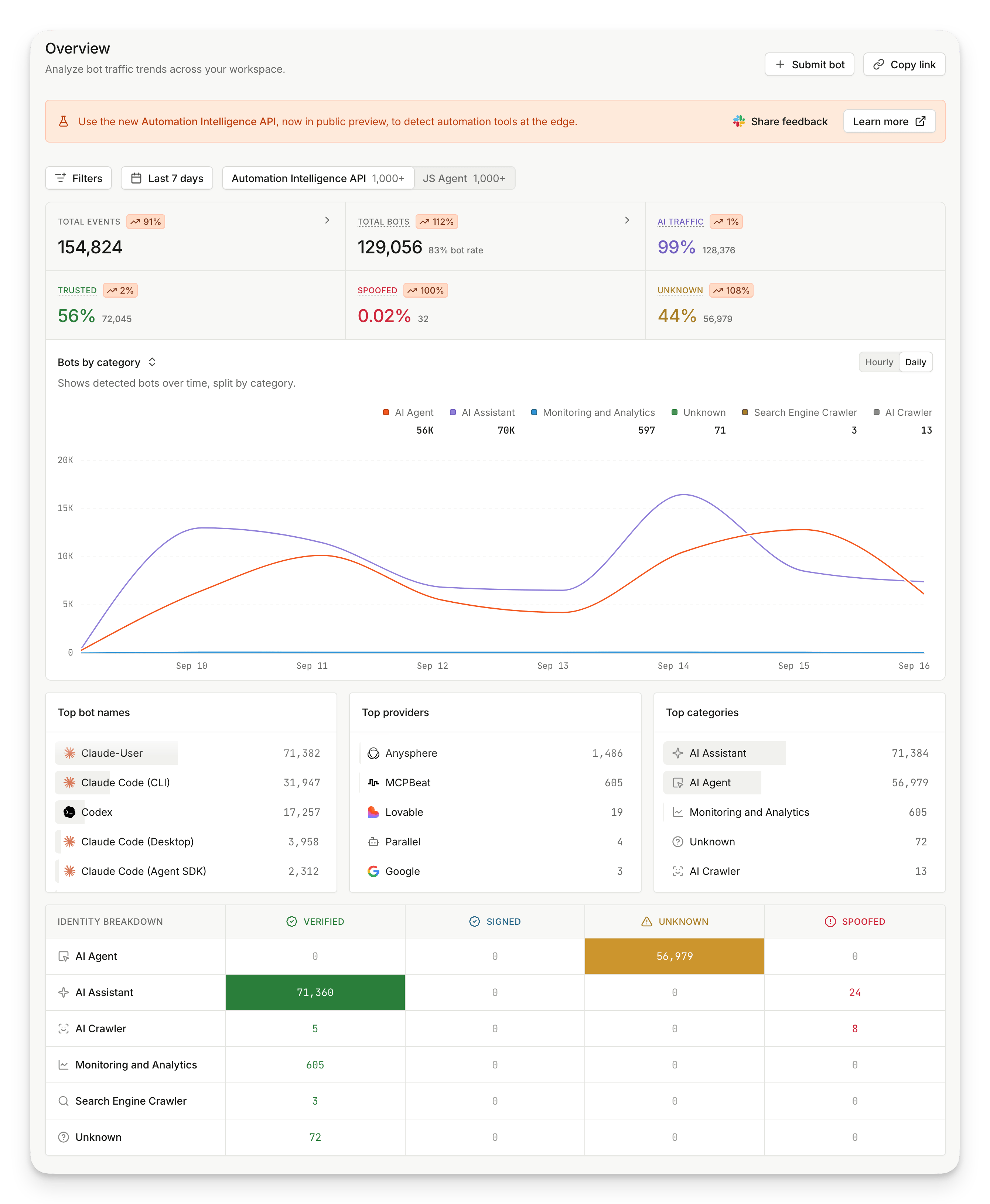
The Overview page shows bot traffic trends across your workspace as a row of key metrics, a timeline chart, distribution lists, and an identity breakdown.
You can access the Overview page by visiting **Dashboard** > [**Bots & AI agents**](https://dashboard.fingerprint.com/bot-detection) > **Overview**.
 ### Data sources
Fingerprint detects automation in two ways. Switching tabs changes the data behind every metric, chart, and list on the page.
| Tab | Data source |
| ------------------------------- | -------------------------------------------------------------------------------------------- |
| **Automation Intelligence API** | Automation tools detected at the edge from HTTP request metadata, without a JavaScript agent |
| **JS Agent** | Automation tools identified in the browser by the JavaScript agent |
Each tab shows the number of events recorded from that source. For guidance on which detection method fits your traffic, see [Bot Detection overview](/docs/bot-detection/overview#automation-intelligence-api-detecting-automation-without-a-browser).
### Filters
The filter bar applies to every metric, chart, and list on the page. Filter state is stored in the page URL, so **Copy link** shares the exact view you are looking at.
| Filter | Description |
| --------------- | ----------------------------------------------------------------------- |
| **Bot name** | Find detections of a specific bot, such as `Claude-User` or `Googlebot` |
| **Category** | Find detections in a specific bot category |
| **Provider** | Find detections of bots operated by a specific provider |
| **Identity** | Find detections with a specific identity verification result |
| **Confidence** | Find detections reported with high, medium, or low confidence |
| **Proxy** | Find detections coming from an IP address detected as a proxy |
| **VPN** | Find detections coming from an IP address detected as a VPN |
| **Environment** | Find detections associated with a specific environment |
### Key metrics
The key metrics show the size and composition of your bot traffic for the selected period, each with a change compared to the previous period.
| Metric | Description |
| ---------------- | -------------------------------------------------------------------------------------------------- |
| **Total events** | Number of events recorded for the selected data source |
| **Total bots** | Number of events classified as a bot, and the share of all events they represent |
| **AI traffic** | Share of bot detections that came from an AI category, such as AI agents, assistants, and crawlers |
| **Trusted** | Share of bot detections with a verified identity |
| **Spoofed** | Share of bot detections that claim a public identity but fail verification |
| **Unknown** | Share of bot detections that do not publish a verifiable identity |
**Spoofed** and **Unknown** are highlighted only when the count is above zero.
### Timeline charts
The timeline chart plots one view of your bot traffic over time. Select the chart from the dropdown above it, and switch between **Hourly** and **Daily** granularity.
| Timeline chart | Description |
| ------------------------- | --------------------------------------------------------- |
| **Bots by category** | Shows detected bots over time, split by category |
| **AI agents by provider** | Shows AI bot traffic over time, split by provider |
| **Trusted bots** | Shows trusted bot detections over time, split by identity |
| **Total bots** | Shows total events and detected bots over time |
| **Spoofed bots** | Shows spoofed bot detections over time |
| **Unknown bots** | Shows unknown bot detections over time |
### Distribution lists
The distribution lists rank the entities that generated the most detections for your current filters.
| Distribution list | Description |
| ------------------ | ------------------------------------------------ |
| **Top bot names** | The individual bots detected most often |
| **Top providers** | The bot providers generating the most detections |
| **Top categories** | The most common bot categories detected |
### Identity breakdown
The identity breakdown is a matrix of bot categories against identity results, with the number of detections in each cell. Use it to see how trust varies by category. Verified AI assistants and unknown AI agents are different kinds of traffic, even though both appear as bots.
| Identity | Description |
| ------------ | -------------------------------------------------------------------------------------- |
| **Verified** | Well-known bot with publicly verifiable identity, directed by the bot provider |
| **Signed** | Bot that signs its platform via Web Bot Auth, directed by the bot provider's customers |
| **Unknown** | Bot that does not publish a verifiable identity |
| **Spoofed** | Bot that claims a public identity but fails verification |
* **AI Agent**
* **AI Assistant**
* **AI Browser**
* **AI Crawler**
* **AI Search**
* **Advertising and Marketing**
* **Aggregator**
* **Browser Automation**
* **Ecommerce**
* **Monitoring and Analytics**
* **Scraping**
* **Search Engine Crawler**
* **Search Engine Optimization**
* **Security**
* **Other**
* **Unknown**
To register your own bot so it is detected with a verified identity, use **Submit bot** on the Overview page, or see [Web Bot Auth implementation](/docs/bot-detection/web-bot-auth-implementation).
## Events page
The Events page lists individual automation events, so you can find a specific event and open its full details.
You can access the Events page by visiting **Dashboard** > [**Bots & AI agents**](https://dashboard.fingerprint.com/bot-detection) > **Events**.
### Data sources
Fingerprint detects automation in two ways. Switching tabs changes the data behind every metric, chart, and list on the page.
| Tab | Data source |
| ------------------------------- | -------------------------------------------------------------------------------------------- |
| **Automation Intelligence API** | Automation tools detected at the edge from HTTP request metadata, without a JavaScript agent |
| **JS Agent** | Automation tools identified in the browser by the JavaScript agent |
Each tab shows the number of events recorded from that source. For guidance on which detection method fits your traffic, see [Bot Detection overview](/docs/bot-detection/overview#automation-intelligence-api-detecting-automation-without-a-browser).
### Filters
The filter bar applies to every metric, chart, and list on the page. Filter state is stored in the page URL, so **Copy link** shares the exact view you are looking at.
| Filter | Description |
| --------------- | ----------------------------------------------------------------------- |
| **Bot name** | Find detections of a specific bot, such as `Claude-User` or `Googlebot` |
| **Category** | Find detections in a specific bot category |
| **Provider** | Find detections of bots operated by a specific provider |
| **Identity** | Find detections with a specific identity verification result |
| **Confidence** | Find detections reported with high, medium, or low confidence |
| **Proxy** | Find detections coming from an IP address detected as a proxy |
| **VPN** | Find detections coming from an IP address detected as a VPN |
| **Environment** | Find detections associated with a specific environment |
### Key metrics
The key metrics show the size and composition of your bot traffic for the selected period, each with a change compared to the previous period.
| Metric | Description |
| ---------------- | -------------------------------------------------------------------------------------------------- |
| **Total events** | Number of events recorded for the selected data source |
| **Total bots** | Number of events classified as a bot, and the share of all events they represent |
| **AI traffic** | Share of bot detections that came from an AI category, such as AI agents, assistants, and crawlers |
| **Trusted** | Share of bot detections with a verified identity |
| **Spoofed** | Share of bot detections that claim a public identity but fail verification |
| **Unknown** | Share of bot detections that do not publish a verifiable identity |
**Spoofed** and **Unknown** are highlighted only when the count is above zero.
### Timeline charts
The timeline chart plots one view of your bot traffic over time. Select the chart from the dropdown above it, and switch between **Hourly** and **Daily** granularity.
| Timeline chart | Description |
| ------------------------- | --------------------------------------------------------- |
| **Bots by category** | Shows detected bots over time, split by category |
| **AI agents by provider** | Shows AI bot traffic over time, split by provider |
| **Trusted bots** | Shows trusted bot detections over time, split by identity |
| **Total bots** | Shows total events and detected bots over time |
| **Spoofed bots** | Shows spoofed bot detections over time |
| **Unknown bots** | Shows unknown bot detections over time |
### Distribution lists
The distribution lists rank the entities that generated the most detections for your current filters.
| Distribution list | Description |
| ------------------ | ------------------------------------------------ |
| **Top bot names** | The individual bots detected most often |
| **Top providers** | The bot providers generating the most detections |
| **Top categories** | The most common bot categories detected |
### Identity breakdown
The identity breakdown is a matrix of bot categories against identity results, with the number of detections in each cell. Use it to see how trust varies by category. Verified AI assistants and unknown AI agents are different kinds of traffic, even though both appear as bots.
| Identity | Description |
| ------------ | -------------------------------------------------------------------------------------- |
| **Verified** | Well-known bot with publicly verifiable identity, directed by the bot provider |
| **Signed** | Bot that signs its platform via Web Bot Auth, directed by the bot provider's customers |
| **Unknown** | Bot that does not publish a verifiable identity |
| **Spoofed** | Bot that claims a public identity but fails verification |
* **AI Agent**
* **AI Assistant**
* **AI Browser**
* **AI Crawler**
* **AI Search**
* **Advertising and Marketing**
* **Aggregator**
* **Browser Automation**
* **Ecommerce**
* **Monitoring and Analytics**
* **Scraping**
* **Search Engine Crawler**
* **Search Engine Optimization**
* **Security**
* **Other**
* **Unknown**
To register your own bot so it is detected with a verified identity, use **Submit bot** on the Overview page, or see [Web Bot Auth implementation](/docs/bot-detection/web-bot-auth-implementation).
## Events page
The Events page lists individual automation events, so you can find a specific event and open its full details.
You can access the Events page by visiting **Dashboard** > [**Bots & AI agents**](https://dashboard.fingerprint.com/bot-detection) > **Events**.
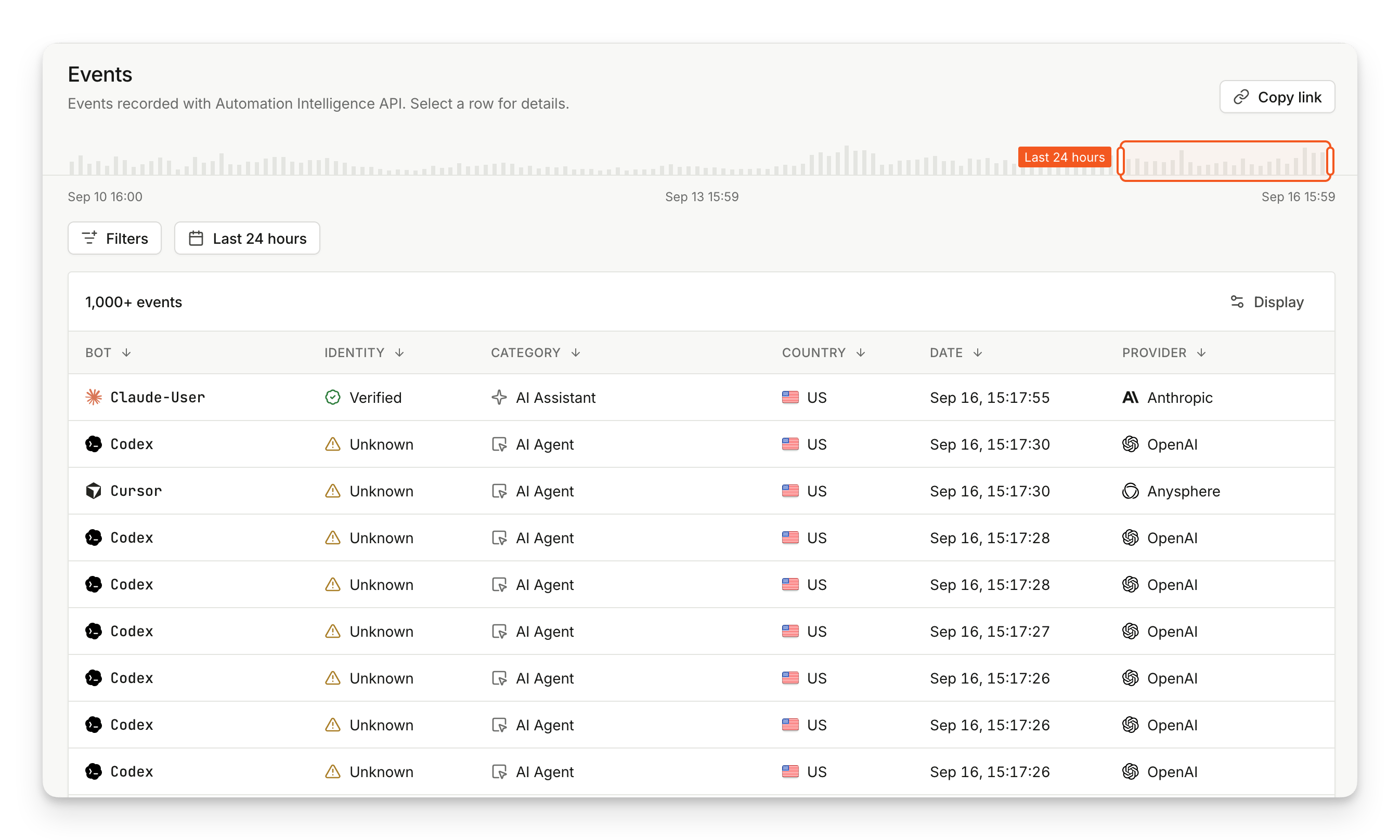 The Events page lists events recorded with the Automation Intelligence API only. To investigate bots detected by the JavaScript agent, use the [Identification](/docs/analytics#identification-events) page and filter by bot detection.
Above the filter bar, the activity scrubber shows event volume across the whole retention window. Drag the selection to narrow the table to a shorter period, or use the date range picker for a fixed range.
The Events page uses the same filters as the Overview page, plus two more:
| Filter | Description |
| ---------------- | ------------------------------------------------------------ |
| **Bot detected** | Find only events that were, or were not, classified as a bot |
| **IP address** | Find events coming from a specific IP address |
Select any row to open its event details.
* **Date**
* **Bot**
* **Identity**
* **Category**
* **URL**
* **IP Address**
* **Country**
* **Provider**
* **Confidence**
* **Proxy**
* **VPN**
* **Event ID**
## Event details page
The event details page shows the full context Fingerprint recorded for a single automation event.
The Events page lists events recorded with the Automation Intelligence API only. To investigate bots detected by the JavaScript agent, use the [Identification](/docs/analytics#identification-events) page and filter by bot detection.
Above the filter bar, the activity scrubber shows event volume across the whole retention window. Drag the selection to narrow the table to a shorter period, or use the date range picker for a fixed range.
The Events page uses the same filters as the Overview page, plus two more:
| Filter | Description |
| ---------------- | ------------------------------------------------------------ |
| **Bot detected** | Find only events that were, or were not, classified as a bot |
| **IP address** | Find events coming from a specific IP address |
Select any row to open its event details.
* **Date**
* **Bot**
* **Identity**
* **Category**
* **URL**
* **IP Address**
* **Country**
* **Provider**
* **Confidence**
* **Proxy**
* **VPN**
* **Event ID**
## Event details page
The event details page shows the full context Fingerprint recorded for a single automation event.
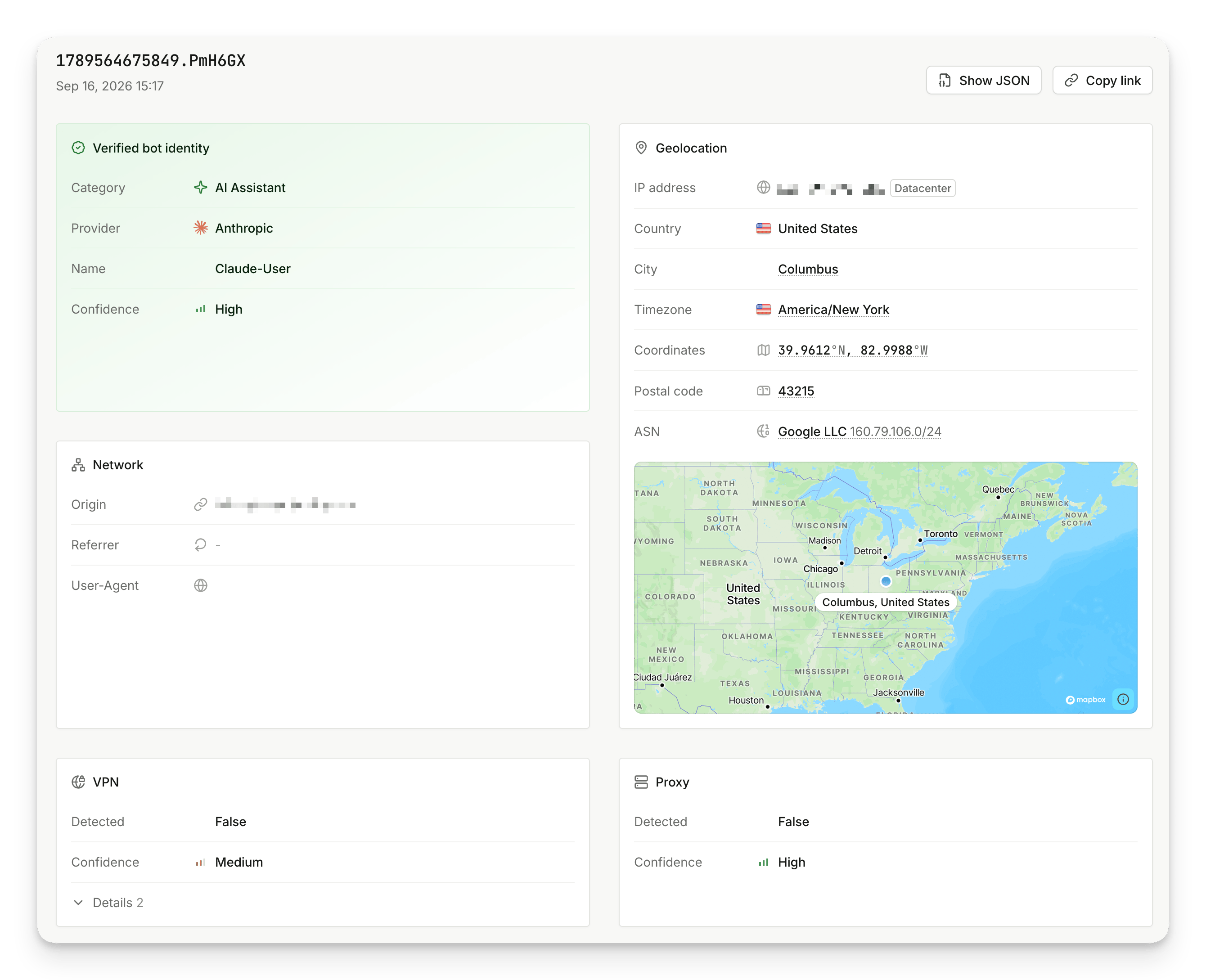 On the page you can find:
1. **Bot identity**: the category, provider, name, and confidence of the detection. The card is titled with the identity result, and reads **Bot not detected** when the event was not classified as a bot.
2. **Geolocation**: the IP address, country, city, timezone, coordinates, postal code, ASN, and a map of the approximate location.
3. **Network**: the origin, referrer, and User-Agent of the request.
4. **VPN**: whether a VPN was detected, with confidence and the methods that contributed to the result.
5. **Proxy**: whether a proxy was detected, with confidence.
Use **Show JSON** to explore the entire event payload, and **Copy link** to share the event with your team.
## Data retention
Retention differs by data source, because Automation Intelligence API events are stored separately from identification events.
| Data source | Available history |
| ------------------------------- | --------------------------------------------------------- |
| **Automation Intelligence API** | Up to the last 7 days, while the API is in Public Preview |
| **JS Agent** | Up to the last 30 days |
## Related guides
How Fingerprint detects AI agents, browsers, and automation tools, and what each result means.
Detect automation from HTTP request metadata alone, without a JavaScript agent.
The bots and AI agents Fingerprint can detect, with their result types.
On the page you can find:
1. **Bot identity**: the category, provider, name, and confidence of the detection. The card is titled with the identity result, and reads **Bot not detected** when the event was not classified as a bot.
2. **Geolocation**: the IP address, country, city, timezone, coordinates, postal code, ASN, and a map of the approximate location.
3. **Network**: the origin, referrer, and User-Agent of the request.
4. **VPN**: whether a VPN was detected, with confidence and the methods that contributed to the result.
5. **Proxy**: whether a proxy was detected, with confidence.
Use **Show JSON** to explore the entire event payload, and **Copy link** to share the event with your team.
## Data retention
Retention differs by data source, because Automation Intelligence API events are stored separately from identification events.
| Data source | Available history |
| ------------------------------- | --------------------------------------------------------- |
| **Automation Intelligence API** | Up to the last 7 days, while the API is in Public Preview |
| **JS Agent** | Up to the last 30 days |
## Related guides
How Fingerprint detects AI agents, browsers, and automation tools, and what each result means.
Detect automation from HTTP request metadata alone, without a JavaScript agent.
The bots and AI agents Fingerprint can detect, with their result types.