> ## Documentation Index
> Fetch the complete documentation index at: https://docs.fingerprint.com/llms.txt
> Use this file to discover all available pages before exploring further.
# Blocking Origins and IPs
Fingerprint allows you to [filter requests](/docs/request-filtering) to prevent bad actors from making identification requests using your account. Filtered-out requests do not count toward your Fingerprint billing. However, if you use Cloudflare Proxy Integration, those requests can still be proxied through your Cloudflare worker, which can increase your Cloudflare costs.
To prevent this, you can block specific IPs or origins at the Cloudflare worker level by using Cloudflare's Web Application Firewall.
**Cloudflare Web Application Firewall**
* You are limited to 5 WAF custom rules on the Cloudflare [free plan](https://www.cloudflare.com/plans/).
* This guide uses the Cloudflare dashboard to create WAF custom rules manually. You can also create and modify custom rules programmatically using the [Cloudflare API](https://developers.cloudflare.com/waf/custom-rules/create-api/).
## 1. Find the worker route
The JavaScript agent v4 uses a single worker route for all requests to Fingerprint servers.
The easiest way to find your route is from the JavaScript agent configuration snippet on **SDKs & integrations** > **Cloudflare**:
1. Go to **SDKs & integrations** > **Cloudflare** in the Fingerprint dashboard.
2. Find the JavaScript agent configuration snippet.
3. Copy the `WORKER_PATH` part from the `endpoints` value.
For example, if your snippet uses `https://yourwebsite.com/icXhT6JSJ2MhAdk6/?region=us`, then your worker route to protect is `/icXhT6JSJ2MhAdk6*`.
## 2. Create a firewall rule
Create a [custom rule](https://developers.cloudflare.com/waf/custom-rules/) in your Cloudflare WAF.
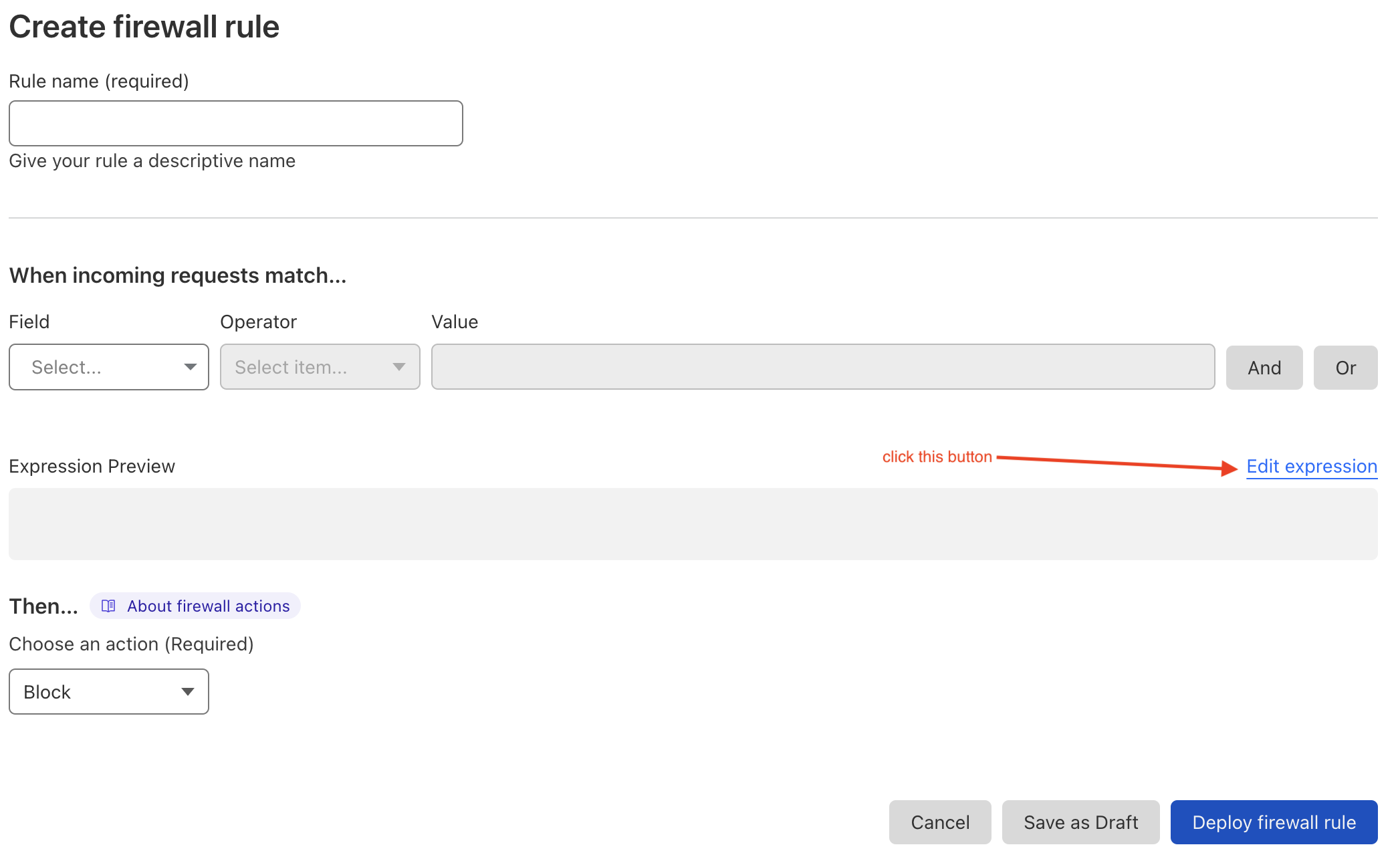
1. In the Cloudflare dashboard, go to **Websites** > **Your website** > **Security** > **WAF** > **Custom rules**.
2. Click **Create rule**.
3. Enter a name for the rule.
4. Use the visual editor or click **Edit expression** to define the rule using the [Rules language](https://developers.cloudflare.com/ruleset-engine/rules-language/).
5. Choose `Block` as the rule action.
6. Click **Deploy**.
 ### Block requests from specific IP addresses
For example, to block IPs `111.111.112.113`, `114.112.222.33`, and the entire `211.12.82.0/24` subnet for worker route `/icXhT6JSJ2MhAdk6*`, use this expression:
```txt theme={"theme":"github-dark-dimmed"}
(
ip.src in {111.111.112.113, 114.112.222.33, 211.12.82.0/24}
and starts_with(http.request.uri.path, "/icXhT6JSJ2MhAdk6")
)
```
### Block requests from specific `origin` and `referer`
For example, to block requests from `example1.com` for the same worker route, use this expression:
```txt theme={"theme":"github-dark-dimmed"}
(
starts_with(http.request.uri.path, "/icXhT6JSJ2MhAdk6")
and
(
any(http.request.headers["origin"][*] == "https://example1.com")
or
any(http.request.headers["referer"][*] contains "https://example1.com/")
)
)
```
Block requests by `referer` in addition to `origin` because some request types [do not include the `origin` header](https://developer.mozilla.org/en-US/docs/Web/HTTP/Headers/Origin#description).
See the [Cloudflare rules language documentation](https://developers.cloudflare.com/ruleset-engine/rules-language/) for more details.
### Cloudflare limitations
* Each rule expression can contain up to [4096 symbols](https://developers.cloudflare.com/ruleset-engine/rules-language/expressions/#maximum-rule-expression-length)
* The number of custom rules depends on [your Cloudflare plan](https://www.cloudflare.com/plans/)
### Block requests from specific IP addresses
For example, to block IPs `111.111.112.113`, `114.112.222.33`, and the entire `211.12.82.0/24` subnet for worker route `/icXhT6JSJ2MhAdk6*`, use this expression:
```txt theme={"theme":"github-dark-dimmed"}
(
ip.src in {111.111.112.113, 114.112.222.33, 211.12.82.0/24}
and starts_with(http.request.uri.path, "/icXhT6JSJ2MhAdk6")
)
```
### Block requests from specific `origin` and `referer`
For example, to block requests from `example1.com` for the same worker route, use this expression:
```txt theme={"theme":"github-dark-dimmed"}
(
starts_with(http.request.uri.path, "/icXhT6JSJ2MhAdk6")
and
(
any(http.request.headers["origin"][*] == "https://example1.com")
or
any(http.request.headers["referer"][*] contains "https://example1.com/")
)
)
```
Block requests by `referer` in addition to `origin` because some request types [do not include the `origin` header](https://developer.mozilla.org/en-US/docs/Web/HTTP/Headers/Origin#description).
See the [Cloudflare rules language documentation](https://developers.cloudflare.com/ruleset-engine/rules-language/) for more details.
### Cloudflare limitations
* Each rule expression can contain up to [4096 symbols](https://developers.cloudflare.com/ruleset-engine/rules-language/expressions/#maximum-rule-expression-length)
* The number of custom rules depends on [your Cloudflare plan](https://www.cloudflare.com/plans/)